Showing posts with label asp.net(c#). Show all posts

Wednesday, December 26, 2012

Server Application Unavailable Asp.net


Please visit my new Web Site https://coderstechzone.com


 If you have ever received an error message in a .Net application that simply stated "Server Application Unavailable" you might find this useful.

Also you found below message including above:
The web application you are attempting to access on this web server is currently unavailable. Please hit the "Refresh" button in your web browser to retry your request.

Administrator Note: An error message detailing the cause of this specific request failure can be found in the application event log of the web server. Please review this log entry to discover what caused this error to occur.


Reason:
If you run more than one .Net framework in your web server and use same application pool for different web application with different framework than you will get such type of error message.

Resolution:
Go to IIS. Right click on Application Pools--> NEW-->Application Pool.
Now go to your site-->right click-->Properties-->Select the newly created Application pool at the bottom of virtual directory tab.

Hope it will help you.

Saturday, March 24, 2012

Sort multiple column of a DataView in Asp.net C#


Please visit my new Web Site https://coderstechzone.com


In many case studies we found that when sorting is required developers done this job in back end means running extra query in database even though he has an already disconnected record set in his hand like DataView which also create an overhead to the application. One can easily sort the DataView columns in both ascending and descending order. Its very simple and for showing or displaying any type of sorted data in your report or details page you can do it without connecting to the Database through disconnected DataView. To define the sort direction we can use ASC or DESC keyword after the column name. For multiple column we just add comma separator for each column.


Code Example is given below:

// Create DataView from a DataTable Instance
DataView DV = datatable1.DefaultView;

// If you do not define sorting order then default Ascending order will be applied
DV.Sort = "ProductName ASC, CategoryName ASC, Price DESC";

For more details on DataTable or DataView CLICK HERE.

Thursday, March 1, 2012

Master page Group Radio Button problem Vertically in Gridview Control using Javascript in ASP.net C#


Please visit my new Web Site https://coderstechzone.com


In those cases where you need to choose or select one value from a list of values then grouping radio button is required. But unfortunately in ASP.Net there is no easiest built in way to group radio button vertically. But some times to meet client requirement we need to do group Radio Button vertically. It’s a grouping problem which most of the developer experience at least once in his student life or development life. Here i will try to write a javascript function to resolve Radio Button grouping problem within Gridview rows. It will also work in master page as well as in non master page. If you need to grouping Horizontally then read my THIS POST.

Output:
Problem in Grouping Radio Button

To do that we need to write a Javascript which will ensure single selection from a set of Radio Buttons in the following way:
1. First we need to know which Radio Button is clicked
2. Pass the selected Radio Button reference to the Javascript Function
3. Loop through Radio Button Array and set checked=false for others
4. Now you will get only one selected Radio Button at a time in your whole Gridview control

The complete HTML Markup is:
<script type="text/javascript">
        function GridSelection(objType)
        {
            var oItem = objType.children;
            var SelectedCtrl=(objType.type=="radio")?objType:objType.children.item[0];
            bChecked=SelectedCtrl.checked;
            arrRButtons=SelectedCtrl.form.elements;
            for(i=0;i<arrRButtons.length;i++)
            if(arrRButtons[i].type=="radio" && arrRButtons[i].id!=SelectedCtrl.id)
                arrRButtons[i].checked=!bChecked;
        }
    </script>

    <b>Who is your favourite player:</b><br />
    <asp:GridView ID="GridView1" runat="server" DataKeyNames="ID" HorizontalAlign="Left">
        <Columns>
        <asp:boundfield datafield="Name" headertext="Super Player" />
        <asp:templatefield headertext="Choose">
            <ItemTemplate>
                <asp:radiobutton runat="server" id="chkChoose" onclick="javascript:GridSelection(this);"/>
            </ItemTemplate>
        </asp:templatefield>
        </Columns>
    </asp:GridView>
    <asp:Button runat="server" ID="cmdGet" Text="Get Selected Value" OnClick="cmdGet_Click" /><br />
    <asp:Literal runat="server" ID="ltrl"></asp:Literal>

The complete Codebehind Code is:
protected void Page_Load(object sender, EventArgs e)
    {
        if (!IsPostBack)
        {
            DataTable dtPlayers = new DataTable("Super_Player");
            dtPlayers.Columns.Add(new DataColumn("ID", System.Type.GetType("System.UInt64")));
            dtPlayers.Columns.Add(new DataColumn("Name"));
            dtPlayers.Rows.Add(1, "Leonel Messi");
            dtPlayers.Rows.Add(2, "Christiano Ronaldo");
            dtPlayers.Rows.Add(3, "Carlos Tevez");
            dtPlayers.Rows.Add(4, "Xavi");
            dtPlayers.Rows.Add(5, "Iniesta");
            GridView1.DataSource = dtPlayers;
            GridView1.DataBind();
        }
    }

    protected void cmdGet_Click(object sender, EventArgs e)
    {
        foreach (GridViewRow oRow in GridView1.Rows)
        {
            if (((RadioButton)oRow.FindControl("chkChoose")).Checked)
                ltrl.Text = "Selected ID = " + GridView1.DataKeys[oRow.RowIndex].Value + "
 Selected Name = " + oRow.Cells[0].Text;
            // Now You can do update or delete or anything.................. Based on selection
        }
    }

Hope now you can apply single selection or group Radio Button in your Master Pages as well as normal pages. The javascirpt code is tested for Internet Explorer, Mozila Firefox, Opera, Google Chrome etc.

Leave your comment if can not implement.

Happy coding.

Read DataKeyNames value of Gridview row using Asp.net C#


Please visit my new Web Site https://coderstechzone.com


When we need to bind data in a Gridview column then we need to add an unique reference number which will help to identify a specific object or a datarow. Some developers use hidden field to store the ID column of a table on which he can INSERT UPDATE or DELETE based on hidden ID column. But this is not a good practice. Because Gridview control gives us a property named DataKeyNames on which we can assign our unique ID or code column value to distinguish invidual row. Here in this example i will show how one can read DataKeyNames value from code behind. Asp.net Gridview control also provides us a facility to assign more ID or Code type column in a single Gridview for each DataRow item specialy for composite keys of a table to bind. I have already discuss "How to use more DataKeynames in a Gridview". Also i have discuss on "Jquery to read DatakeyNames value of Selected Rows of GridView".

Sample Output:
Read Datakeynames of a Gridview row

HTML Markup Code:
<asp:GridView ID="GridView1" runat="server" DataKeyNames="ID" HorizontalAlign="Left">
        <Columns>
            <asp:boundfield datafield="Name" headertext="Super Player" />
        </Columns>
    </asp:GridView>

Codebehind Code:
protected void Page_Load(object sender, EventArgs e)
    {
        if (!IsPostBack)
        {
            DataTable dtPlayers = new DataTable("Super_Player");
            dtPlayers.Columns.Add(new DataColumn("ID", System.Type.GetType("System.UInt64")));
            dtPlayers.Columns.Add(new DataColumn("Name"));
            dtPlayers.Rows.Add(1, "Leonel Messi");
            dtPlayers.Rows.Add(2, "Christiano Ronaldo");
            dtPlayers.Rows.Add(3, "Carlos Tevez");
            dtPlayers.Rows.Add(4, "Xavi");
            dtPlayers.Rows.Add(5, "Iniesta");
            GridView1.DataSource = dtPlayers;
            GridView1.DataBind();

            foreach (GridViewRow oRow in GridView1.Rows)
                Response.Write("DataKeyNames="+GridView1.DataKeys[oRow.RowIndex].Value + "
");
        }
    }
Hope now you can use DataKeyNames property of a Gridview control efficiently when required.

Friday, December 9, 2011

Learn Tutorial of Asp.net Page Life Cycle


Please visit my new Web Site https://coderstechzone.com


When a user send request to the Web server, the page passes a lot of events during initialization and disposal. Generally an Asp.net aspx page contains a lot of server side controls as well as HTML controls & user controls. Most of the developer does not bother the life cycle events. But its not a good practice because to be a good & knowledgeable developer or programmer you have to learn the Life Cycle of an Asp.net aspx page. Otherwise you will be failed to get advantage specially when developing user controls. It's also a common & crucial or vital question on Asp.net interview viva or written exam.

For better understanding I have divide the Sequential loading of page cycle in two ways as follows:

1. First time request of a page
2. Postback of a page


See the initial level summary from below:

Asp.net interview question page life cycle


First time request of a page:
1. Object Initialization: Creates instance of the server control. The initialization event can be overridden using the OnInit method. The event associated with the cycle is Page_Init. In this phase the page knows the types of objects and how many to create.

2. Loading: The instance of the control is loaded onto the page object in which it is defined. In this phase you can catch the objects through Javascript like objects visibility, width, height and value. The Load event can be overridden by calling OnLoad method. The event associated with the cycle is Page_Load.

3. PreRendering: Associated value of the control is assigned. This is the last time changes of objects to save into the viewstate. After the execution of the method controls value is locked for the viewstate. The PreRender step can be overridden using OnPreRender method. The event associated with the cycle is Page_PreRender.

4. Saving: The state values of the control is saved to the viewstate.The value is attached in the HTML tag which we found in the browser view source action menu. It can be overridden by calling SaveViewState method.

5. Rendering: In this page corresponding HTML tag of the controls will be created. It can be overridden by calling OnPreRender method. The event associated with the cycle is Page_Render.

6. Disposing: At this stage the pages objects will be disposed. Basically this is the cleanup stage. Close all files, DB connections in this stage.

7. Unloading: This is the final event in the life cycle of the server control. In this phase all server control instances will be destroyed. The event associated with the cycle is Page_UnLoad.


Postback of a page:
1. Initializing: Same as before.
2. Loading View State: In this stage controls are populated with the appropriate viewstate data.
3. Loading: Same as before.
4. Loading the postback data: In this phase updates the control state with the correct postback data.
5. PreRendering: Same as before.
6. Saving State: The change of control between the current request and the previous request of the page is saved. For each change, the corresponding event is raised. For example, if the text of a textbox is changed, the new text is saved and a text_change event is raised.
7. Rendering: Same as before.
8. Disposing: Same as before.
9. Unloading: Same as before.

Hope it will help you alot for preparing ASP.net interview viva.

Tuesday, May 17, 2011

Make Regular Expression Checker in 10 minutes using Asp.net C#


Please visit my new Web Site https://coderstechzone.com


In most of the times we need to make or create a regular expression to find matching patterns from a given string or a file. Many languages support this feature like Javascript and also Asp.net C#. Regular expresion makes our life easy. Few days ago i have done a dataminig project where i found that how much necessary the regular expression is. I understand its power and capability. The developer who wants to learn regular expression then first gather some knowledge on regular expression and then use this easy and simple tool to test the pattern matches.It will definitely increases your confidence as well as skills on Regular Expression. So the regular expression example in back & forth.

The output looks like:
Regular Expression Checker

Design the UI in the following way:
<table border="0">
        <tr>
            <td>Regular Expression: </td><td><asp:TextBox ID="txtExp" runat="server" Width="200px"></asp:TextBox></td>
        </tr>
        <tr>
            <td>Contents: </td><td><asp:TextBox ID="txtContent" runat="server" Columns="40" TextMode="MultiLine" Rows="5"></asp:TextBox></td>
        </tr>
        <tr>
            <td>Result: </td><td><asp:TextBox ID="txtResult" runat="server" Width="200px"></asp:TextBox></td>
        </tr>
        <tr>
            <td></td><td><asp:Button ID="cmdExecute" runat="server" Text="Execute" OnClick="cmdExecute_Click" /></td>
        </tr>
    </table>
Now under Execute button click event write the following server code:
protected void cmdExecute_Click(object sender, EventArgs e)
    {
        string content = txtContent.Text;
        string pattern = txtExp.Text;
        MatchCollection mc = Regex.Matches(content, pattern);
        string sWord = "";
        if (mc.Count > 0)
        {
            for (int i = 0; i < mc.Count; i++)
            {
                if (sWord.Length == 0)
                    sWord = mc[i].Value;
                else
                    sWord =sWord+ ","+ mc[i].Value;
            }
        }
        txtResult.Text = sWord;
    }
Hope now you can test regular expressions in many different ways.

Sunday, March 27, 2011

Validate XML aganist an XSD in Asp.Net C#


Please visit my new Web Site https://coderstechzone.com


Most of the times when we are working with XML we need to validate the XML file from an XSD file. Here i am showing an code example how one can validate XML file using an XSD in Asp.Net C#.

To do that add an aspx page in your project.


Now under Page_Load event write the below code:
using System;
using System.Xml;
using System.Text;
using System.Xml.Schema;

public partial class Validate_XML_XSD : System.Web.UI.Page
{
    private StringBuilder sB = new StringBuilder();
    protected void Page_Load(object sender, EventArgs e)
    {
        if (!IsPostBack)
        {
            string xmlPath = MapPath("MenuXML.xml");
            string xsdPath = MapPath("MenuXML.xsd");

            XmlReaderSettings settings = new XmlReaderSettings();
            settings.ValidationType = ValidationType.Schema;
            settings.Schemas.Add(null, XmlReader.Create(xsdPath));

            XmlReader Oreader = XmlReader.Create(xmlPath, settings);
            XmlDocument Odoc = new XmlDocument();
            Odoc.Load(Oreader);
            ValidationEventHandler eventHandler = new ValidationEventHandler(ValidationEventHandler);

            Odoc.Validate(eventHandler);
            if (sB.ToString() == String.Empty)
                Response.Write("Validation completed successfully.");
            else
                Response.Write("Validation Failed: " + sB.ToString());
        }
    }

    public void ValidationEventHandler(object sender, ValidationEventArgs args)
    {
        sB.Append("Error: " + args.Message);
    }  
}

Hope now you can validate XML file easily.

Creating XSD file from an XML file in Asp.Net within few seconds


Please visit my new Web Site https://coderstechzone.com


There are a lot of tools in the internet you will get to create XSD file from an XML file but you need to download then install or may be convert on-line. But there is good news that Asp.Net has built in menu to create XSD file from an XML file.


To do that first write the below XML file in VisualStudio:
<?xml version="1.0" encoding="utf-8" ?>
<Home>
  <Menu text="Books" url="MenuFromXml.aspx">
    <SubMenu text="Asp.Net" url="MenuFromXml.aspx"></SubMenu>
    <SubMenu text="Ajax" url="MenuFromXml.aspx"></SubMenu>
    <SubMenu text="MS SQL Server 2005" url="MenuFromXml.aspx"></SubMenu>
    <SubMenu text="JavaScript" url="MenuFromXml.aspx"></SubMenu>
  </Menu>
  <Menu text="Electronics"  url="MenuFromXml.aspx">
    <SubMenu text="Camera" url="MenuFromXml.aspx">
      <SubMenu text="Digital" url="MenuFromXml.aspx">
        <SubMenu text="Canon" url="MenuFromXml.aspx"></SubMenu>
        <SubMenu text="Kodak" url="MenuFromXml.aspx"></SubMenu>
        <SubMenu text="Sony" url="MenuFromXml.aspx"></SubMenu>
        <SubMenu text="Casio" url="MenuFromXml.aspx"></SubMenu>
        <SubMenu text="Fuji" url="MenuFromXml.aspx"></SubMenu>
      </SubMenu>
      <SubMenu text="Film Camera" url="MenuFromXml.aspx"></SubMenu>
    </SubMenu>
    <SubMenu text="DVDs" url="MenuFromXml.aspx">
      <SubMenu text="Comedy" url="MenuFromXml.aspx">
        <SubMenu text="English" url="MenuFromXml.aspx"></SubMenu>
        <SubMenu text="French" url="MenuFromXml.aspx"></SubMenu>
        <SubMenu text="German" url="MenuFromXml.aspx"></SubMenu>
        <SubMenu text="Spanish" url="MenuFromXml.aspx"></SubMenu>
      </SubMenu>
      <SubMenu text="Kids Movies" url="MenuFromXml.aspx"></SubMenu>
      <SubMenu text="Romance Movies" url="MenuFromXml.aspx"></SubMenu>
      <SubMenu text="Action Movies" url="MenuFromXml.aspx"></SubMenu>
    </SubMenu>
  </Menu>
  <Menu text="Contact Us" url="MenuFromXml.aspx"></Menu>
</Home>

Now you found a menu named "XML" in VS Main menu. View:

Now click on Create schema will create the below XSD file:
<?xml version="1.0" encoding="utf-8"?>
<xs:schema attributeFormDefault="unqualified" elementFormDefault="qualified" xmlns:xs="http://www.w3.org/2001/XMLSchema">
  <xs:element name="Home">
    <xs:complexType>
      <xs:sequence>
        <xs:element maxOccurs="unbounded" name="Menu">
          <xs:complexType>
            <xs:sequence minOccurs="0">
              <xs:element maxOccurs="unbounded" name="SubMenu">
                <xs:complexType>
                  <xs:sequence minOccurs="0">
                    <xs:element maxOccurs="unbounded" name="SubMenu">
                      <xs:complexType>
                        <xs:sequence minOccurs="0">
                          <xs:element maxOccurs="unbounded" name="SubMenu">
                            <xs:complexType>
                              <xs:attribute name="text" type="xs:string" use="required" />
                              <xs:attribute name="url" type="xs:string" use="required" />
                            </xs:complexType>
                          </xs:element>
                        </xs:sequence>
                        <xs:attribute name="text" type="xs:string" use="required" />
                        <xs:attribute name="url" type="xs:string" use="required" />
                      </xs:complexType>
                    </xs:element>
                  </xs:sequence>
                  <xs:attribute name="text" type="xs:string" use="required" />
                  <xs:attribute name="url" type="xs:string" use="required" />
                </xs:complexType>
              </xs:element>
            </xs:sequence>
            <xs:attribute name="text" type="xs:string" use="required" />
            <xs:attribute name="url" type="xs:string" use="required" />
          </xs:complexType>
        </xs:element>
      </xs:sequence>
    </xs:complexType>
  </xs:element>
</xs:schema>

Wow done wthin few seconds.

Bind DataSource into DataList example in Asp.Net


Please visit my new Web Site https://coderstechzone.com


The DataList control is a standard control of Asp.Net like others. It is used to display repeated list of data or items. You can bind any datasource in this DataList control like DataTable, SqlDataReader and XML etc. In most e-commerce site use DataList control to display products insted of repeater control. Here in this example i will show you how one can bind data to DataList control in runtime.

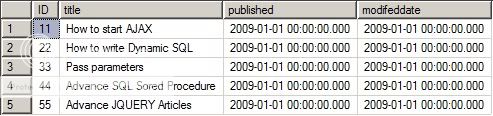
Table snapshot that we bound to the control:
DataList table structure


Now add an Aspx page in your project and write the below HTML markup code:
<%@ Page Language="C#" AutoEventWireup="true" CodeFile="DataList.aspx.cs" Inherits="DataList" %>

<!DOCTYPE html PUBLIC "-//W3C//DTD XHTML 1.0 Transitional//EN" "http://www.w3.org/TR/xhtml1/DTD/xhtml1-transitional.dtd">

<html xmlns="http://www.w3.org/1999/xhtml" >
<head runat="server">
    <title>DataList DataBinding Example</title>
</head>
<body>
    <form id="form1" runat="server">
    <div>
        <asp:DataList id="DataList1" runat="server">
            <ItemTemplate>
                Title: 
                <asp:Label id="Label6" runat="server" Text='<%# DataBinder.Eval(Container.DataItem, "Title") %>'></asp:Label>
                <br />
                Published: 
                <asp:Label id="Label7" runat="server" Text='<%# DataBinder.Eval(Container.DataItem, "Published") %>'></asp:Label>
                <br />
                Modified: 
                <asp:Label id="Label2" runat="server" Text='<%# DataBinder.Eval(Container.DataItem, "ModifedDate") %>'></asp:Label>
            </ItemTemplate>
            <HeaderTemplate>
                <asp:Label id="Label1" runat="server" Font-Names="Tahoma" Font-Italic="True">List of Articles:</asp:Label>
                <hr />
            </HeaderTemplate>
            <FooterTemplate>
                <hr />
            </FooterTemplate>
            <SeparatorTemplate>
                <hr />
            </SeparatorTemplate>
        </asp:DataList>    
    </div>
    </form>
</body>
</html>

Now under Page_Load event write the below server side code:
protected void Page_Load(object sender, EventArgs e)
    {
        if (!IsPostBack)
        {
            DataList1.DataSource = PopulateData();
            DataList1.DataBind();
        }
    }

    public SqlDataReader PopulateData()
    {
        string conStr=@"Data Source=.\SQLExpress;Initial Catalog=TESTDB;User Id=sa;Password=Comm!pass@1;";
        SqlConnection Conn = new SqlConnection(conStr);
        string sQuery="SELECT * FROM Article";
        SqlCommand sqlCommand = new SqlCommand(sQuery, Conn);
        Conn.Open();
        SqlDataReader dataReader=sqlCommand.ExecuteReader(System.Data.CommandBehavior.CloseConnection);
        return dataReader;
    }

Dont forget to add the "using System.Data.SqlClient;" namespace.

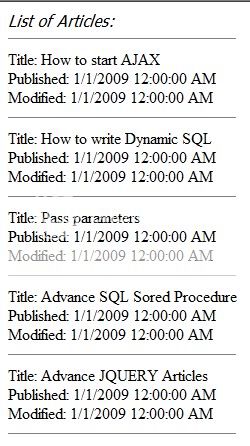
Now run the project & hope you will get below output:
DataList output
Hope now you bound the DataList control to display repeated data.

Wednesday, March 23, 2011

Tricks for URL Rewriting using Request.PathInfo in Asp.Net


Please visit my new Web Site https://coderstechzone.com


To publish cleaner URL in your Asp.Net application you can use URL Rewriting. The most popular reason for URL Rewriting is let you have implemented pages based on query string like http://yourdomain/product.aspx?Brand=Lux. But now you want to change the URL to http://yourdomain/product.aspx/Lux for SEO purpose. There is a lot of way to implement this. One of the easy trick is you can achieve URL Rewriting by using Request.PathInfo of Asp.Net. Mind it this is not the best way for a huge site because this technique requires some of coding which is error prone. One another thing that if you have 10 brands & you use query string to populate Brand related product then google will index only one url but if you use URL like http://yourdomain/product.aspx/Lux then google will treat all ten individual pages. Nice thing am i right? Another reason for URL Rewriting is to server the pages those users have bookmarked old query string URL's. Let’s move for implementation. To do that first add a page in your project and named it BrandList.aspx.


Add a button in this page and write the below code under button click event:
Response.Redirect("Product.aspx/Lux");

Now add another page and name the page product.aspx. Now write the following server side code:
protected void Page_Load(object sender, EventArgs e)
    {
        if (!IsPostBack)
        {
            Response.Write("Brand=" + GetBrand());
            // Now you can do anything sinch you have got the BrandName
        }
    }

    public string GetBrand()
    {
        if (Request.PathInfo.Length == 0)
            return Request["Brand"];
        else
            return Request.PathInfo.Substring(1);
    }

Now run the BrandList page and click on the button. Check your browser address you will find a SEO friendly URL. The previous bookmark users also get your product list.

Monday, March 21, 2011

Check user name login name email address availability using jquery ajax in Asp.Net page


Please visit my new Web Site https://coderstechzone.com


In most registration page we need to check the availability of user name or email address using Jquery/Ajax. Because it will be hectic job for user to rewrite the data after getting post back error that user name already taken or email address already taken. So it would be very helpful for user if he can check his name or login name or email address availability in time without losing any data. To do that in this article i will show you GMAIL like feature by using Jquery & Asp.Net Ajax. The test output screen look like this:

Check login Name Availability

Now add a handler by right clicking on solution name. Then click on Add New Item and then select Generic Handler. Name the handler to "user_Login.ashx".
Write the below code within the handler:
using System;
using System.Web;
using System.Data.SqlClient;
using System.Configuration;

public class user_Login : IHttpHandler 
{
    
    public void ProcessRequest (HttpContext context) 
    {
        string user_name = context.Request["user_name"];     
        string output = "";
        output = CheckAvailability(user_name);
        context.Response.Write(output);
        context.Response.End();
    }

    public string CheckAvailability(string user_name)
    {
        SqlConnection con = new SqlConnection(ConfigurationManager.ConnectionStrings["TestConnection"].ConnectionString);
        con.Open();
        SqlCommand com = new SqlCommand("Select User_Name from tblUsers where User_Name=@Name", con);
        com.Parameters.AddWithValue("@Name", user_name);
        string uName = (string)com.ExecuteScalar();
        con.Close();
        if (uName != null)
            return "1";
        else
            return "0";
    }
    
    public bool IsReusable 
    {
        get {return false;}
    }
}

Now add an aspx page & write the below HTML code:
<%@ Page Language="C#" AutoEventWireup="true" CodeFile="Check_USER_EMAIL.aspx.cs" Inherits="Check_USER_EMAIL" %>

<!DOCTYPE html PUBLIC "-//W3C//DTD XHTML 1.0 Transitional//EN" "http://www.w3.org/TR/xhtml1/DTD/xhtml1-transitional.dtd">

<html xmlns="http://www.w3.org/1999/xhtml" >
<head runat="server">
    <title>Check user or email address availability</title>
    <script src="Script/jquery.js" type="text/javascript"></script>
    <script type="text/javascript">
    $(function() {
        $("#cmdCheck").click(function() {
        $.post("user_Login.ashx", { user_name: $("#<% =txtName.ClientID %>").val() }, function(output) {
        if (output == "1") 
        {                    
            $("#dv_Ajax_Response").html("Name already exist!");
        }
        else{                    
            $("#dv_Ajax_Response").html("Still available");
            }

        });
        });
    });

</script>
</head>
<body>
    <form id="form1" runat="server">
    <div>
    <asp:TextBox ID="txtName" runat="server"></asp:TextBox>
    <input type="button" id="cmdCheck" value="Available?" />
    <div id="dv_Ajax_Response" style="color:Red;font-weight:bold"></div>
    </div>
    </form>
</body>
</html>

Now run the page. Hope you can now check the availability of user name or user login or email address before submit the full registration page.

Friday, December 3, 2010

Using Server.Transfer how to pass values from source page to destination page


Please visit my new Web Site https://coderstechzone.com


It's not possible to pass value using query string from source page to destination page when using Server.Transfer. To pass data or value from source page to destination page while using Server.Transfer you can use HttpContext object. To do that add two aspx pages in your project & give name source.aspx & destination.aspx. In source.aspx page place a LinkButton. And under the LinkButton Click event write the below code:

To learn Difference Between Response.Redirect vs Server.Transfer Click Here.


protected void Linkbutton1_Click(object sender, EventArgs e)

{

HttpContext CurrContext = HttpContext.Current;

CurrContext.Items.Add("Name", "Shawpnendu Bikash Maloroy");

CurrContext.Items.Add("Address", "Dhaka, Bangladesh");

Server.Transfer("Destination.aspx");

}

In Destination.aspx Page under Load event write the below code:
protected void Page_Load(object sender, EventArgs e)

{

if (!IsPostBack)

{

HttpContext CurrContext = HttpContext.Current;

Response.Write(CurrContext.Items["Name"].ToString()+" ");

Response.Write(CurrContext.Items["Address"].ToString());

}

}

Now run the source.aspx page & click on the LinkButton. You will get below output:

Server.transfer

Hope now you can understand how to transfer or pass data between pages while using Server.Transfer.

Difference Between Server.Transfer vs Response.Redirect


Please visit my new Web Site https://coderstechzone.com


There is a common question for developers in Asp.net interview board that "What is the difference between Response.Redirect and Server.Transfer". In a common term we can use both to redirect the user from source page to destination page. But there are some differences in between Response.Redirect and Server.Transfer, which i want to share with you.

Response.Redirect:
1. A round trip occurs to the client before loading the destination page, which means after redirecting a page from source page to destination page a round trip occur into the client to update the address bar and history of the client browser. And also the destination page will be loaded by initiating a new request which is the 2nd request to the server.
2. To pass data in this mechanism you can easily use Query String or Session value.


Server.Transfer:
1.It is a single request from source page to destination page. The destination.aspx will be loaded from the server without a second request. Means it will not update the address bar and history of the browser.
2. You will get better performance.
3. You cannot use Query String.
4. To pass data between souce.aspx page to destination.aspx by using HttpContext object. Click here to use HttpContext object.
5. You can also use session object to transfer data.
6. Users can not bookmark the destination.aspx page.

Friday, November 26, 2010

How to bind XML File or XML DataSource to a DataList Control in Asp.Net


Please visit my new Web Site https://coderstechzone.com


DataList control is an important control in Asp.Net applications. Most of the times we need to bind DataList control from a Database using Ado.Net datasource. But sometimes we need to bind XML file as Datasource into a DataList control. Here in this article i will demonstrate how one can bind XML data into a DataList control using the datasource XmlDataSource. The output will be:

Bind XML data into DataList controlo

To do the above example we need to write an XML file like:
<?xml version="1.0" encoding="utf-8" ?>
<Customers>
  <Customer>
    <Name>Shawpnendu Bikash Maloroy</Name>
    <Address>Uttara, Dhaka</Address>
    <City>Dhaka</City>
    <Phone>011789657</Phone>
  </Customer>
  <Customer>
    <Name>Bimolandu Bikash Maloroy</Name>
    <Address>Sonaimuri, Noakhali</Address>
    <City>Noakhali</City>
    <Phone>019789687</Phone>
  </Customer>
  <Customer>
    <Name>Purnendu Bikash Maloroy</Name>
    <Address>FirmGate, Dhaka</Address>
    <City>Dhaka</City>
    <Phone>018788767</Phone>
  </Customer>
  <Customer>
    <Name>Shadesh Chandra Chanda</Name>
    <Address>Maijdee, Noakhali</Address>
    <City>Noakhali</City>
    <Phone>015787597</Phone>
  </Customer>
  <Customer>
    <Name>Sajal Chandra Chanda</Name>
    <Address>Maijdee, Noakhali</Address>
    <City>Noakhali</City>
    <Phone>019734557</Phone>
  </Customer>
</Customers>

Now add an aspx page into your project & modify the HTML markup like below:
<%@ Page Language="C#" AutoEventWireup="true" CodeFile="DataList_XML.aspx.cs" Inherits="DataList_XML" %>

<!DOCTYPE html PUBLIC "-//W3C//DTD XHTML 1.0 Transitional//EN" "http://www.w3.org/TR/xhtml1/DTD/xhtml1-transitional.dtd">

<html xmlns="http://www.w3.org/1999/xhtml">
<head runat="server">
    <title>An Example of Binding XML Datasource into DataList Control</title>
</head>
<body>
    <form id="form1" runat="server">
    <div>
    
    <asp:DataList ID="DataList1" runat="server" DataSourceID="XmlDataSource1"> 
        <HeaderTemplate>Customer Name</HeaderTemplate>
        <ItemStyle BackColor="Gray" ForeColor="Yellow" />
        <AlternatingItemStyle BackColor="Silver" />
        <ItemTemplate>
            <%# XPath("Name")%>
        </ItemTemplate>
    </asp:DataList>
    
    <asp:XmlDataSource ID="XmlDataSource1" runat="server" 
        DataFile="Customers.xml" 
        XPath="//Customers/Customer">
    </asp:XmlDataSource>
    
    </div>
    </form>
</body>
</html>

Now run the page. Hope you will get your desired output.

Web Parts Drag & Drop functionality in Asp.net Pages


Please visit my new Web Site https://coderstechzone.com


It’s my first article on Asp.net Web Parts. Basically it’s an introduction article how one can start to learn the high end feature of Asp.net web parts. As you knew that most of the portal contains several block. In general the end user can not change the page block orientation or positioning which is termed as personalization. The Asp.net Web Parts gives us the personalization facility with little code. That’s why the Web Parts is necessary to learn. In my below example I will show you how developers can provide the Drag & Drop facility to personalize end user UI.

To do that you have to understand only two things. The first one is WebPartManager & the second one is WebPartZone.

WebPartManager:
This Asp.net server control manages the state of the zones per user basis. The most important part is you must place an Asp.net WebPartManager server control in each page. But the situation is different for master page as we know. The another importance of the WebPartManager server control is to maintain the communication between different elements contained in a zone or within different zone. Let’s say in one zone you display the product list & in another zone you display the product details. Which means zones are dependent on each other. If you select a product in first zone then you must change the product details in next zone. For such type of cases communication is required done by WebPartManager.

WebPartZone:
WebPartZone contains the elements that you want to Drag & Drop. You can Drag & Drop contains from one zone to another zone. The WebPartManager just controls the zones. You cannot put zone contents into the rest of the pages which does not contain another zone.

Note:
Please note that by default Asp.net creates ASPNETDB.MDF and stores it in the App_Data folder.

Start Example:
Add an Aspx page in your project. Write the below HTML markup:
<%@ Page Language="C#" AutoEventWireup="true" CodeFile="WebParts.aspx.cs" Inherits="WebParts" %>

<!DOCTYPE html PUBLIC "-//W3C//DTD XHTML 1.0 Transitional//EN" "http://www.w3.org/TR/xhtml1/DTD/xhtml1-transitional.dtd">

<html xmlns="http://www.w3.org/1999/xhtml">
<head runat="server">
    <title>An Example on Asp Web Parts</title>
</head>
<body>
    <form id="form1" runat="server">
    <div>
        <asp:WebPartManager ID="WebPartManager1" runat="server" >
        </asp:WebPartManager>
        <table border="1">
        <tr style="background:Blue">
        <td colspan="3">
        <h1 style="color:White">Welcome to shawpnendu.blogspot.com</h1> 
        </td>
        </tr>
        
        <tr>
        <td>
        <asp:WebPartZone ID="WebPartZone1" runat="server" HeaderText="Enter Name">
            <ZoneTemplate>
            <asp:TextBox runat="server" ID="txtLastName" Title="Enter Last Name:"></asp:TextBox>
            </ZoneTemplate>
        </asp:WebPartZone>
        </td>
        
        <td>
        <asp:WebPartZone ID="WebPartZone2" runat="server" HeaderText="Enter Name">
            <ZoneTemplate>
            <asp:TextBox runat="server" ID="txtMiddleName" Title="Enter Middle Name:"></asp:TextBox>
            </ZoneTemplate>
            </asp:WebPartZone>
        </td>
        
        <td>
        <asp:WebPartZone ID="WebPartZone3" runat="server" HeaderText="Enter Name">
            <ZoneTemplate>
            <asp:TextBox runat="server" ID="txtFirstName" Title="Enter First Name:"></asp:TextBox>
            </ZoneTemplate>

        </asp:WebPartZone> 
        </td>
        
        </tr>
        </table>
    </div>
    </form>
</body>
</html>

Please note that control Title property will represent the section name of a zone.

Now run the page & you will get the below output:
Asp.Net Web Parts Introduction

In this scenario you will not get the Drag & Drop facility. Only get Minimize & close option in each zone. Because the Drag & Drop facility based on WebPartManager DisplayMode property. The default value is "Browse". If you change the mode from "Browse" to "Design" mode then you will get Drag & Drop Facility like below:

Asp.Net Web Parts Drag & Drop

To change the WebPartManager DisplayMode property just write the below code:
protected void Page_Load(object sender, EventArgs e)
    {
        if (!IsPostBack)
        {
            WebPartManager1.DisplayMode = WebPartManager1.SupportedDisplayModes[1];
            Response.Write("Current MODE= " + WebPartManager1.SupportedDisplayModes[1].Name + "");
        }
    }

Ok now test the page & start to learn Asp.Net Web Parts. Drag one content & Drop the selected content into another zone. Now run the page again & the interesting thing is the page retain your last zone orientations. Because Asp.net stores your action into the ASPNETDB.MDF. Later on i will discuss zone to zone communication steps.

Thursday, September 30, 2010

Jquery to get set read access IFrame content TextBox Value Data


Please visit my new Web Site https://coderstechzone.com


As you know that this days smart developers doesn't use IFRAME. But in our job always developers need to handle legacy systems. I found such type of legacy application. Now i am trying to modify the user requirement. To do that i need to read or access IFrame content as well as get or put some data from parent page to IFRAME. Since i did it thats why i want to share with you how one can access/read/get IFrame content controls like TextBox value as well as set the value from parent page to IFRAME using JQUERY.

Here is a simple output screenshot of my example:
IFRAME_Jquery

To complete this example first create the below asp.net aspx page. Which we used within the IFRAME:
<%@ Page Language="C#" AutoEventWireup="true" CodeFile="Iframe_Page_Content.aspx.cs" Inherits="Iframe_Page_Content" %>

<!DOCTYPE html PUBLIC "-//W3C//DTD XHTML 1.0 Transitional//EN" "http://www.w3.org/TR/xhtml1/DTD/xhtml1-transitional.dtd">

<html xmlns="http://www.w3.org/1999/xhtml" >
<head runat="server">
    <title>Child page placed into the IFrame</title>
</head>
<body>
    <form id="form1" runat="server">
    <div>
    <asp:Label runat="server" ID="lblInfo">Iframe TextBox: </asp:Label>
    <asp:TextBox runat="server" ID="txtInfo"></asp:TextBox>
    </div>
    </form>
</body>
</html>
Now create the below asp.net master page:
<%@ Page Language="C#" AutoEventWireup="true" CodeFile="IFRame_Jquery.aspx.cs" Inherits="IFRame_Jquery" %>

<!DOCTYPE html PUBLIC "-//W3C//DTD XHTML 1.0 Transitional//EN" "http://www.w3.org/TR/xhtml1/DTD/xhtml1-transitional.dtd">

<html xmlns="http://www.w3.org/1999/xhtml" >
<head runat="server">
    <title>How to Get Set Iframe Content Like TextBox Control Value Text Data</title>
    <script src="Script/jquery.js" type="text/javascript"></script>

</head>
<body>
    <form id="form1" runat="server">
    <div>
        <iframe id="uploadIFrame" scrolling="no" frameborder="0" style="border-style: none; margin: 0px; width: 100%; height: 40px;" src="Iframe_Page_Content.aspx"></iframe>    
        <asp:Button runat="server" ID="btnSet" Text="Hello Jquery Developers !!" />
        <asp:Button runat="server" ID="btnGet" Text="Click to read Iframe TextBox Data !!" />
    </div>
    </form>
</body>
</html>
Now use the below JQUERY to get set value:
<script language="javascript">
        $(document).ready(function() {
            $("#btnSet").click(function() {
                var $currIFrame = $('#uploadIFrame'); 
                $currIFrame.contents().find("body #txtInfo").val($('#btnSet').val());
                return false;
            });
        });

        $(document).ready(function() {
            $("#btnGet").click(function() {
                var $currIFrame = $('#uploadIFrame'); 
                alert($currIFrame.contents().find("body #txtInfo").val());
                return false;
            });
        });

    </script>

Hope one can access IFRAME content as well as set the value from parent page to IFrame using JQUERY.

Code Explanation:
Here I have created an Object named currIFrame which holds the full IFrame reference. The contents() method is used to get full HTML code inside the IFRAME.The Find() method is used to find out the element. The rest of the code is self explanatory. Hope you can understand.

Script tested for:
1. Internet Explorer (IE)
2. Mozilla Firefox
3. Opera
4. Google Chrome

Tuesday, September 21, 2010

Jquery to get SelectedValue SelectedIndex SelectedText of a DropdownList in Asp.net


Please visit my new Web Site https://coderstechzone.com


When you bind a DropdownList by data sometimes it may require to do something in the client side using javascript or jquery. To read the same post using javascript click here. In this article i will show you how one can get DropdownList SelectedValue, SelectedText & SelectedIndex. So that you can now play with Asp.net DropdownList control. The output like below:

Drodwnlist jquery

An example of complete code is given below:
<html xmlns="http://www.w3.org/1999/xhtml" >
<head runat="server">
    <title>How to get Selected value, Selected index & Selected text of a DropDownList</title>
    <script src="Script/jquery.js" type="text/javascript"></script>
    
    
<script type="text/javascript">
        $(function () {
            $('select[id$=DropDownList1]').bind("change keyup", function () {
                $('#info').html(
                "<b>Selected Value:</b> " + $('#<%= DropDownList1.ClientID%>').val() +
                "<br />" +
                "<b>Selected Index:</b> " + $('#<%= DropDownList1.ClientID%>').get(0).selectedIndex +
                "<br />" +
                "<b>Selected Text:</b> " + $('select[id$=DropDownList1] :selected').text());
            });
        });
    </script>
        
</head>
<body>
    <form id="form1" runat="server">
    <div>
<h2>To display Selectedvalue, Selectedindex & Selectedtext please select an item from the DropDownList</h2>
        <asp:DropDownList ID="DropDownList1" runat="server" >
            <asp:ListItem Text="One" Value="1"></asp:ListItem>
            <asp:ListItem Text="Two" Value="2"></asp:ListItem>
            <asp:ListItem Text="Three" Value="3"></asp:ListItem>
            <asp:ListItem Text="Four" Value="4"></asp:ListItem>
            <asp:ListItem Text="Five" Value="5"></asp:ListItem>
        </asp:DropDownList>
        <hr /><br />
        <div id="info"></div>    </div>
    </form>
</body>
</html>

Code explanation:
The line $('#<%= DropDownList1.ClientID%>').val() will return you the selectedtext.
The line $('#<%= DropDownList1.ClientID%>').get(0).selectedIndex will return you the selectedindex
The line $('select[id$=DropDownList1] :selected').text()) will return you selectedtext.

Note:
Here i used two event change & keyup because the change event works in IE wheres keyup event works for Mozilla, Chrome and Safari.

Script Tested for the following browsers:
1. Internet Explorer (IE)
2. Mozilla Firefox
3. Opera
4. Google Chrome

Wednesday, August 4, 2010

How to prevent avoid Session Timeouts in an Asp.Net C# vb.net Page


Please visit my new Web Site https://coderstechzone.com


As we knew that its a very big problem specially when developers provide a very large entry page to users. It will be Irritating for users after entering all data & then session timeout occur. To prevent or avoid session timeout problem, there is no fixed or specific or direct way to handle. But one can handle this problem using javascript asynchronous call. But one thing keep in mind that time to execute the javacript method must be less than your session timeout time. Otherwise the method will not work. So, carefully set the time aganist IIS or web.config file session time. The cross-browser javascript method is given below:


<script language="javascript" type="text/javascript"> 
function Prevent_Session_Timeout() 
{ 
var callerurl = "Prevent_Session.aspx"; 

if (window.XMLHttpRequest) 
{ 
xhttp = new XMLHttpRequest() 
} 
else 
{ 
xhttp = new ActiveXObject("Microsoft.XMLHTTP") 
} 
xhttp.open("POST", callerurl, true); 
xhttp.send(""); 

window.setTimeout("Prevent_Session_Timeout();", 60000); 
} 

//Initial calling
Prevent_Session_Timeout(); 
</script> 

Important Notes:
1. Just create an aspx page named Prevent_Session.aspx. Because this page will be internally called by the above javascript method without any reflection to user.
2. You must set the window.setTimeout time parameter which never exceed the session timeout time of your project.
3. Paste the code in your main master page so that you need not write the code for each aspx page.

Script Tested for the following browsers:
1. Internet Explorer (IE)
2. Mozilla Firefox
3. Opera
4. Google Chrome

Tuesday, August 3, 2010

Maintaining Scroll Position after Asp.Net Page PostBack


Please visit my new Web Site https://coderstechzone.com


Sometimes we need to Maintain scroll position after page postback specially if the page is a large page & user need to work in the middle portion of the page. In this article i will give you a simple tips on How to maintain Scroll Position after Asp.Net Page PostBack. To do that in the Page Directive of your large Asp.Net Page, add the property 'MaintainScrollPositionOnPostback' and set its value as 'true'.


For Example:
<%@ Page Language="C#" CodeFile="Default.aspx.cs" MaintainScrollPositionOnPostback="true" Inherits="_Default" %> 
Now, the page will maintain the scroll bar position in the same location as it is before postback.

Monday, August 2, 2010

Error: Specified string is not in the form required for an e-mail address


Please visit my new Web Site https://coderstechzone.com


This error may occur when you are working with .net 1.1 means when using the namespace Sytstem.Web.Mail. If we want to send email to multiple or more than one person usually we use like:

To=aaaaaaa@gmail.com;bbbbbbbb@gmail.com;ccccccccc@gmail.com;

This will work in the namespace Sytstem.Web.Mail because here we use semicolon to split or separate email ID's.

But the ERROR: "Specified string is not in the form required for an e-mail address" will appear when we use semicolon as a separator in .net 2.0. Because the namespace System.Net.Mail in .net 2.0 framework will use comma as the email separator instead of semicolon. So we will use like below:

To="aaaaaaa@gmail.com,bbbbbbbb@gmail.com,ccccccccc@gmail.com";

Hope now your problem has been resolved.
Want To Search More?
Google Search on Internet
Subscribe RSS Subscribe RSS
Article Categories
  • Asp.net
  • Gridview
  • Javascript
  • AJAX
  • Sql server
  • XML
  • CSS
  • Free Web Site Templates
  • Free Desktop Wallpapers
  • TopOfBlogs
     
    Free ASP.NET articles,C#.NET,VB.NET tutorials and Examples,Ajax,SQL Server,Javascript,Jquery,XML,GridView Articles and code examples -- by Shawpnendu Bikash