Subscribe


Please visit my new Web Site https://coderstechzone.com
In maximum time virus or for other problems like:
1. The file is in use by another program or user
2. The source or destination file may be in use
3. Make sure the disk is not full or write-protected and that the file is not currently in use
4. Cannot delete file: Access is denied
Solution no 2:
1. Start Task Manager
2. Click on Processes Tab
3. Select Explorer.exe
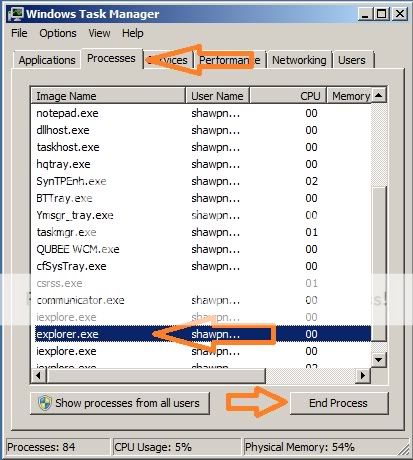
4. Click on "End Process" - Now your every window will be closed
5. Do not close the Task Manager
6. Now click on File-->New Task (Run..)
7. Now write "Explorer" on Open: input box
8. Now click on OK
9. Now one window is open - browse the problematic file and delete the file normally
Hope your problem will be resolved.
1. The file is in use by another program or user
2. The source or destination file may be in use
3. Make sure the disk is not full or write-protected and that the file is not currently in use
4. Cannot delete file: Access is denied
You may not delete a file easily. For such type of problem the shortest solution is "FileASSASSIN". FileASSASSIN is a free software which you can download from here. Now install it in your system. To delete a file open the software first then choose the problematic file through Browse button or drop the file using mouse. Now if you directly delete the file then checked the "Delete File" option. Else if you want to keep the file but want to keep the file inactive then do not check the option "Delete File" option. At last click on Execute button. Hope now your problem will be resolved. The snapshot of FileAssassin is given below:

Solution no 2:
1. Start Task Manager
2. Click on Processes Tab
3. Select Explorer.exe
4. Click on "End Process" - Now your every window will be closed
5. Do not close the Task Manager
6. Now click on File-->New Task (Run..)
7. Now write "Explorer" on Open: input box
8. Now click on OK
9. Now one window is open - browse the problematic file and delete the file normally
Hope your problem will be resolved.