Friday, August 1, 2014

Jquery to generate Random Number


Please visit my new Web Site https://coderstechzone.com


In many forums i found a question "How to generate a Random Number using Jquery?". Its easy to generate a Random number because Jquery provides us builtin Math library function Math.random() to generate the number. To get the output you have to put a number range. Then the the mehod Math.random() will give you a Random Number. You can also use this technique for dice, random image script, or random link generator.

I have tried to produce the below output:
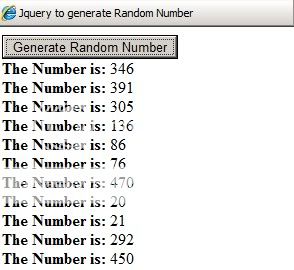
Jquery Random Number

To do that add an asp.net aspx page and write the below code under form tag:
<asp:Button ID="Button1" runat="server" Text="Generate Random Number" />
    <div id="divNumber">
        
    </div>

Now under head tag write the below JQuery function or method:
<script type="text/javascript">
        $(document).ready(function() {
            $("#Button1").click(function() {
                var Random_Number = Math.ceil(Math.random()*500); // Generate random number between 1 and 500               
                $("#divNumber").append("<b>The Number is: </b>"+Random_Number+"</br>");
                return false;
            });
        });
    </script>
The complete markup code should be:
<%@ Page Language="C#" AutoEventWireup="true" CodeFile="Jquery_RandomNumber.aspx.cs" Inherits="Jquery_RandomNumber" %>

<!DOCTYPE html PUBLIC "-//W3C//DTD XHTML 1.0 Transitional//EN" "http://www.w3.org/TR/xhtml1/DTD/xhtml1-transitional.dtd">

<html xmlns="http://www.w3.org/1999/xhtml" >
<head runat="server">
    <title>Jquery to generate Random Number</title>
    <script src="Script/jquery.js" type="text/javascript"></script>
    <script type="text/javascript">
        $(document).ready(function() {
            $("#Button1").click(function() {
                var Random_Number = Math.ceil(Math.random()*500); // Generate random number between 1 and 500               
                $("#divNumber").append("<b>The Number is: </b>"+Random_Number+"</br>");
                return false;
            });
        });
    </script>
</head>
<body>
    <form id="form1" runat="server">
    <div>
    <asp:Button ID="Button1" runat="server" Text="Generate Random Number" />
    <div id="divNumber">
        
    </div>

    </div>
    </form>
</body>
</html>
Now run the example and hope you can generate random number using JQuery.

Wednesday, December 26, 2012

Server Application Unavailable Asp.net


Please visit my new Web Site https://coderstechzone.com


 If you have ever received an error message in a .Net application that simply stated "Server Application Unavailable" you might find this useful.

Also you found below message including above:
The web application you are attempting to access on this web server is currently unavailable. Please hit the "Refresh" button in your web browser to retry your request.

Administrator Note: An error message detailing the cause of this specific request failure can be found in the application event log of the web server. Please review this log entry to discover what caused this error to occur.


Reason:
If you run more than one .Net framework in your web server and use same application pool for different web application with different framework than you will get such type of error message.

Resolution:
Go to IIS. Right click on Application Pools--> NEW-->Application Pool.
Now go to your site-->right click-->Properties-->Select the newly created Application pool at the bottom of virtual directory tab.

Hope it will help you.

Friday, April 6, 2012

How to get SP Trigger View code from query analyzer in SQL Server


Please visit my new Web Site https://coderstechzone.com


Sometimes upstream (place to collect data) or your vendor may give you the permission on some Stored Procedure or Trigger or View or even you may have not SQL management Studio or you may can not view those in Management studio. So at that moment how one can view the code. The solution is simple. Use builtin sp_helptext.

Sample Output Screenshot:

View SP Code by TSQL

Syntax:
sp_helptext 'your sp/view/trigger name'
Example:
Lets say i have a stored procedure named TestProcedure then the TSQL will be:
sp_helptext 'TestProcedure'
Hope it will helps.

Saturday, March 24, 2012

Sort multiple column of a DataView in Asp.net C#


Please visit my new Web Site https://coderstechzone.com


In many case studies we found that when sorting is required developers done this job in back end means running extra query in database even though he has an already disconnected record set in his hand like DataView which also create an overhead to the application. One can easily sort the DataView columns in both ascending and descending order. Its very simple and for showing or displaying any type of sorted data in your report or details page you can do it without connecting to the Database through disconnected DataView. To define the sort direction we can use ASC or DESC keyword after the column name. For multiple column we just add comma separator for each column.


Code Example is given below:

// Create DataView from a DataTable Instance
DataView DV = datatable1.DefaultView;

// If you do not define sorting order then default Ascending order will be applied
DV.Sort = "ProductName ASC, CategoryName ASC, Price DESC";

For more details on DataTable or DataView CLICK HERE.

Thursday, March 1, 2012

Master page Group Radio Button problem Vertically in Gridview Control using Javascript in ASP.net C#


Please visit my new Web Site https://coderstechzone.com


In those cases where you need to choose or select one value from a list of values then grouping radio button is required. But unfortunately in ASP.Net there is no easiest built in way to group radio button vertically. But some times to meet client requirement we need to do group Radio Button vertically. It’s a grouping problem which most of the developer experience at least once in his student life or development life. Here i will try to write a javascript function to resolve Radio Button grouping problem within Gridview rows. It will also work in master page as well as in non master page. If you need to grouping Horizontally then read my THIS POST.

Output:
Problem in Grouping Radio Button

To do that we need to write a Javascript which will ensure single selection from a set of Radio Buttons in the following way:
1. First we need to know which Radio Button is clicked
2. Pass the selected Radio Button reference to the Javascript Function
3. Loop through Radio Button Array and set checked=false for others
4. Now you will get only one selected Radio Button at a time in your whole Gridview control

The complete HTML Markup is:
<script type="text/javascript">
        function GridSelection(objType)
        {
            var oItem = objType.children;
            var SelectedCtrl=(objType.type=="radio")?objType:objType.children.item[0];
            bChecked=SelectedCtrl.checked;
            arrRButtons=SelectedCtrl.form.elements;
            for(i=0;i<arrRButtons.length;i++)
            if(arrRButtons[i].type=="radio" && arrRButtons[i].id!=SelectedCtrl.id)
                arrRButtons[i].checked=!bChecked;
        }
    </script>

    <b>Who is your favourite player:</b><br />
    <asp:GridView ID="GridView1" runat="server" DataKeyNames="ID" HorizontalAlign="Left">
        <Columns>
        <asp:boundfield datafield="Name" headertext="Super Player" />
        <asp:templatefield headertext="Choose">
            <ItemTemplate>
                <asp:radiobutton runat="server" id="chkChoose" onclick="javascript:GridSelection(this);"/>
            </ItemTemplate>
        </asp:templatefield>
        </Columns>
    </asp:GridView>
    <asp:Button runat="server" ID="cmdGet" Text="Get Selected Value" OnClick="cmdGet_Click" /><br />
    <asp:Literal runat="server" ID="ltrl"></asp:Literal>

The complete Codebehind Code is:
protected void Page_Load(object sender, EventArgs e)
    {
        if (!IsPostBack)
        {
            DataTable dtPlayers = new DataTable("Super_Player");
            dtPlayers.Columns.Add(new DataColumn("ID", System.Type.GetType("System.UInt64")));
            dtPlayers.Columns.Add(new DataColumn("Name"));
            dtPlayers.Rows.Add(1, "Leonel Messi");
            dtPlayers.Rows.Add(2, "Christiano Ronaldo");
            dtPlayers.Rows.Add(3, "Carlos Tevez");
            dtPlayers.Rows.Add(4, "Xavi");
            dtPlayers.Rows.Add(5, "Iniesta");
            GridView1.DataSource = dtPlayers;
            GridView1.DataBind();
        }
    }

    protected void cmdGet_Click(object sender, EventArgs e)
    {
        foreach (GridViewRow oRow in GridView1.Rows)
        {
            if (((RadioButton)oRow.FindControl("chkChoose")).Checked)
                ltrl.Text = "Selected ID = " + GridView1.DataKeys[oRow.RowIndex].Value + "
 Selected Name = " + oRow.Cells[0].Text;
            // Now You can do update or delete or anything.................. Based on selection
        }
    }

Hope now you can apply single selection or group Radio Button in your Master Pages as well as normal pages. The javascirpt code is tested for Internet Explorer, Mozila Firefox, Opera, Google Chrome etc.

Leave your comment if can not implement.

Happy coding.

Read DataKeyNames value of Gridview row using Asp.net C#


Please visit my new Web Site https://coderstechzone.com


When we need to bind data in a Gridview column then we need to add an unique reference number which will help to identify a specific object or a datarow. Some developers use hidden field to store the ID column of a table on which he can INSERT UPDATE or DELETE based on hidden ID column. But this is not a good practice. Because Gridview control gives us a property named DataKeyNames on which we can assign our unique ID or code column value to distinguish invidual row. Here in this example i will show how one can read DataKeyNames value from code behind. Asp.net Gridview control also provides us a facility to assign more ID or Code type column in a single Gridview for each DataRow item specialy for composite keys of a table to bind. I have already discuss "How to use more DataKeynames in a Gridview". Also i have discuss on "Jquery to read DatakeyNames value of Selected Rows of GridView".

Sample Output:
Read Datakeynames of a Gridview row

HTML Markup Code:
<asp:GridView ID="GridView1" runat="server" DataKeyNames="ID" HorizontalAlign="Left">
        <Columns>
            <asp:boundfield datafield="Name" headertext="Super Player" />
        </Columns>
    </asp:GridView>

Codebehind Code:
protected void Page_Load(object sender, EventArgs e)
    {
        if (!IsPostBack)
        {
            DataTable dtPlayers = new DataTable("Super_Player");
            dtPlayers.Columns.Add(new DataColumn("ID", System.Type.GetType("System.UInt64")));
            dtPlayers.Columns.Add(new DataColumn("Name"));
            dtPlayers.Rows.Add(1, "Leonel Messi");
            dtPlayers.Rows.Add(2, "Christiano Ronaldo");
            dtPlayers.Rows.Add(3, "Carlos Tevez");
            dtPlayers.Rows.Add(4, "Xavi");
            dtPlayers.Rows.Add(5, "Iniesta");
            GridView1.DataSource = dtPlayers;
            GridView1.DataBind();

            foreach (GridViewRow oRow in GridView1.Rows)
                Response.Write("DataKeyNames="+GridView1.DataKeys[oRow.RowIndex].Value + "
");
        }
    }
Hope now you can use DataKeyNames property of a Gridview control efficiently when required.

How to get week number from a date in SQL Server


Please visit my new Web Site https://coderstechzone.com


As a developer i beleive that most of the times we need to built our query based on date column. Some times we need to get or find out the week number from a given date. Sql server provides us such an easy way to find out the week number from a date. The function is DATEPART. By using DATEPART function we can calculate week number easily. Please follow my example code to achieve the expected result.

Sample Output:
TSQL_DATEPART Function Example


To run the example find the following code:
CREATE TABLE [dbo].[Employee]
(
 [ID] [int] NULL,
 [Name] [varchar](200) NULL,
 [JoiningDate] [smalldatetime] NULL
)

INSERT INTO EMPLOYEE VALUES(1,'Shawpnendu','Jan 01, 2012')
INSERT INTO EMPLOYEE VALUES(2,'Bimalandu','Jan 10, 2012')
INSERT INTO EMPLOYEE VALUES(3,'Purnendu','Jan 20, 2012')
INSERT INTO EMPLOYEE VALUES(4,'Amalendu','Jan 30, 2012')
INSERT INTO EMPLOYEE VALUES(5,'Chadbindu','Feb 05, 2012')

SELECT *,DATEPART(wk,JoiningDate) [Week Number] FROM EMPLOYEE

Hope now you can retrieve week number from a given date using DATEPART TSQL function.

Tuesday, February 28, 2012

Can not open Task Manager of Windows remote desktop session?


Please visit my new Web Site https://coderstechzone.com


Some times we need to open remote desktop session Task Manager from our workstation or PC. I think every one will try to open by ALT+CTRL+DEL. But you can not because it open your current desktop Task Manager. But there is a simple tricks you can apply to open the Remote desktop session Task Manager which is ALT+CTRL+END.

Its working am i right? Now you can kill any hanged process or open Explorer. In my cases i need most of the time to kill the explorer of my working server. After closing the explorer from Task Manager and you will close the Task Manager window then you have no way to open the remote desktop session Task Manager without the HOT KEY ALT+CTRL+END.

If you still can't open then apply CTRL + SHIFT + ESC.

Both hot key will work on Windows Server 2003, Windows Server 2008, XP, Windows 7 Etc.

Another reason to apply this tricks is: Lets say you have 5 session of a server. One of them needs to close
the explorer but you can not identify which session you need to close. At that moment its also work for you.

For a practical example CLICK HERE.

Hope it will help you.

Friday, January 27, 2012

Basic introduction of HTTP Protocol


Please visit my new Web Site https://coderstechzone.com


At first what is Protocol? Protocol means a way of communication between two or more parties. To connect two parties like client and server at first we need to establish a connection between them and after that we need to start communication in such a way so that anyone can understand each other. To establish a connection we need a special protocol named Transmission Control Protocol/Internet Protocol (TCP/IP). Which has become the industry-standard method of interconnecting hosts, networks, and the Internet. Now think that connection between client and server has been established. Now we need to set a way of communication like messages, so that they can understand both. This message format standard is HTTP which defines how client will send a request to the server and how the server will response. HTTP stands for "Hypertext Transfer Protocol". In case of Web Browser and Web Server, The Web Browser is HTTP Client and the Web Server is HTTP Server.

More precisely the definition of HTTP protocol is a protocol designed to allow the transfer of Hypertext Markup Language (HTML) documents.


An HTTP transaction is divided into four steps:
1. The browser opens a connection by using TCP/IP.
2. The browser sends a request to the server --> The request is a message and the message format follows HTTP Protocol.
3. The server sends a response to the browser --> The response also a message and the message format follows HTTP Protocol.
4. The connection is closed.

So what we understand? We understand on the Internet, HTTP communication generally takes place over TCP connections. The default port is 80 but other ports can be used..

HTTP Protocol is Connection less:
The protocol is called connection less because An HTTP client opens a connection and sends a request message to the HTTP server, After that the server then returns a response message containing the resource which was requested. After delivering the response, the server closes the connection unlike other protocol likes FTP, which makes HTTP Protocol is a connection less protocol.

HTTP protocol is State less:
When the server responded of client request, the connection between client and server is closed means forgotten. There is no "Tracking System" between client and server. The HTTP server takes every request as a new request means never maintain any connection information between transactions. But there are some ways to maintain states between client and server which i have already described in my previous article: "Passing data/parameters/values from one aspx page to another aspx page".

HTTP Message Example:
Request:
GET /path/file.html HTTP/1.0
From: shawpnendu@gmail.com
User-Agent: HTTPTool/1.0
[blank line here]

Response:
HTTP/4.0 200 OK
Content-Type: text/html
Content-Length: 2000

<html>
<body>
<h1>HELLO WORLD</h1>
(more file contents)
  .
  .
  .
</body>
</html>
To know more about Content-Type CLICK HERE.

HTTP Methods:
The most commonly used methods are GET and POST. To know more about Get and POST method click "Difference between HTTP GET and POST methods".

Other Common Methods are:
HEAD: A HEAD request is just like a GET request, except it asks the server to return the response headers only, and not the actual resource (i.e. no message body). This is useful to check characteristics of a resource without actually downloading it which saves bandwidth. Mostly wide use of this method is crawler.

PUT: Mostly used for uploading files.

Common HTTP Response Status Code:
Successful (2xx):
200: OK
201: Created
202: Accepted
203: Non-Authoritative Information
204: No Content -205 Reset Content
206: Partial Content

Redirection (3xx):
300: Multiple Choices
301: Moved Permanently
302: Moved Temporarily
303: See Other
304: Not Modified
305: Use Proxy


Client error (4xx):
400: Bad Request
401: Unauthorized
402: Payment Required
403: Forbidden
404: Not Found
405: Method Not Allowed
406: Not Acceptable
407: Proxy Authentication Required
408: Request Timeout
409: Conflict
410: Gone
411: Length Required
412: Precondition Failed
413: Request Entity Too Large
414: Request-URI Too Long
415: Unsupported Media Type


Server error (5xx):
500: Internal Server Error
502: Bad Gateway
503: Service Unavailable
504: Gateway Timeout
505: HTTP Version Not Supported

Monday, January 16, 2012

Basic difference on GET and Post HTTP methods


Please visit my new Web Site https://coderstechzone.com


Might be this the first interview question by the viva board. Which is very basic and you have to explain clearly. That's why i am trying to write the post "Basic difference between GET and POST method". Basically both method is used for submitting data into server. Read the differences from below:

Post Mechanism:
1. GET request is sent via URL.
2. Post request is sent via HTTP request body or you can say internally.

GET POST Difference
Figure: Get Method Indication


Sample Code:
<html>
<body>
<Form method="GET" Action="http://search.yahoo.com/bin/search">
Name: 
<input type="Text" name="Name" />
<input type="submit" value="Check" />
</Form>
</body>
</html>
</pre>
</pre>


Form Default Method:
1. GET request is the default method.
2. You have to specify POST method within form tag like <Form method="POST".......

Security:
1. Since GET request is sent via URL, so that we can not use this method for sensitive data data.
2. Since Post request encapsulated name pair values in HTTP request body, so that we can submit sensitive data through POST method.

Length:
1. GET request has a limitation on its length. The good practice is never allow more than 255 characters.
2. POST request has no major limitation. Read discussion part later of this article.

Caching or Bookmarking:
1. GET request will be better for caching and bookmarking.
2. POST request has not.

SEO:
1. GET request is SEO friendly.
2. POST request has not.

Data Type:
1. GET request always submitted data as TEXT.
2. POST request has no restriction.

Best Example:
1. SEARCH will be the best example for GET request.
2. LOGIN will be the best example for POST request.

HTTP Request Message Format:
GET:
GET /path/file.html?SearchText=Interview_Question HTTP/1.0
From: shawpnendu@gmail.com
User-Agent: HTTPTool/1.0
[blank line here]

POST:
POST /path/script.cgi HTTP/1.0
From: shawpnendu@gmail.com
User-Agent: HTTPTool/1.0
Content-Type: application/x-www-form-urlencoded
Content-Length: 8

Code=132

Some comments on the limit on QueryString / GET / URL parameters Length:
1. 255 bytes length is fine, because some older browser may not support more than that.
2. Opera supports ~4050 characters.
3. IE 4.0+ supports exactly 2083 characters.
4. Netscape 3 -> 4.78 support up to 8192 characters.
5. There is no limit on the number of parameters on a URL, but only on the length.
6. The number of characters will be significantly reduced if you have special characters like spaces that need to be URLEncoded (e.g. converted to the '%20').
7. If you are closer to the length limit better use POST method instead of GET method.

Sunday, January 8, 2012

Short description on MIME type


Please visit my new Web Site https://coderstechzone.com


MIME = Multi-purpose Internet Mail Extensions.

This article will explain "What is ENC MIME type". Its a commonly used basic viva/written interview question. MIME type is a standard way of defining file types between HTTP Client and HTTP Server. Without a standard MIME type both client and server can not understand what type of file client received since a file has many extensions like HTML and HTM. To overcome this problem MIME type takes place.

Usually MIME type consists of two parts. One is type and another one is subtype which is separated by a front slash (/). For example the MIME type of Microsoft Excel file is application and the subtype is vnd.ms-excel. So the complete MIME type will be application/vnd.ms-excel. Hope you can understand now.

The web server determine correct MIME type by using a Content-type: header when it responds to a HTTP client request like web browser's.


The following table shows some common MIME types:

text/html: HTML Web Page.
application/octet-stream: To Download a file.
application/msword: For Microsoft Word Document.
application/vnd.ms-excel: For Microsoft Word Excel
application/xml: For XML file
application/zip: For ZIP file
image/bmp: For BMP image
image/png: For PNG type image
image/jpeg: For JPEG file
audio/mpeg: For MPEG type

An example of using MIME type in ASP.Net C#... CLICK HERE

Some other MIME types:

File type MIME type
ai application/postscript
aif audio/x-aiff
aifc audio/x-aiff
aiff audio/x-aiff
asc text/plain
atom application/atom+xml
au audio/basic
avi video/x-msvideo
bcpio application/x-bcpio
bin application/octet-stream
bmp image/bmp
cdf application/x-netcdf
cgm image/cgm
class application/octet-stream
cpio application/x-cpio
cpt application/mac-compactpro
csh application/x-csh
css text/css
dcr application/x-director
dif video/x-dv
dir application/x-director
djv image/vnd.djvu
djvu image/vnd.djvu
dll application/octet-stream
dmg application/octet-stream
dms application/octet-stream
doc application/msword
dtd application/xml-dtd
dv video/x-dv
dvi application/x-dvi
dxr application/x-director
eps application/postscript
etx text/x-setext
exe application/octet-stream
ez application/andrew-inset
gif image/gif
gram application/srgs
grxml application/srgs+xml
gtar application/x-gtar
hdf application/x-hdf
hqx application/mac-binhex40
htm text/html
html text/html
ice x-conference/x-cooltalk
ico image/x-icon
ics text/calendar
ief image/ief
ifb text/calendar
iges model/iges
igs model/iges
jnlp application/x-java-jnlp-file
jp2 image/jp2
jpe image/jpeg
jpeg image/jpeg
jpg image/jpeg
js application/x-javascript
kar audio/midi
latex application/x-latex
lha application/octet-stream
lzh application/octet-stream
m3u audio/x-mpegurl
m4a audio/mp4a-latm
m4b audio/mp4a-latm
m4p audio/mp4a-latm
m4u video/vnd.mpegurl
m4v video/x-m4v
mac image/x-macpaint
man application/x-troff-man
mathml application/mathml+xml
me application/x-troff-me
mesh model/mesh
mid audio/midi
midi audio/midi
mif application/vnd.mif
mov video/quicktime
movie video/x-sgi-movie
mp2 audio/mpeg
mp3 audio/mpeg
mp4 video/mp4
mpe video/mpeg
mpeg video/mpeg
mpg video/mpeg
mpga audio/mpeg
ms application/x-troff-ms
msh model/mesh
mxu video/vnd.mpegurl
nc application/x-netcdf
oda application/oda
ogg application/ogg
pbm image/x-portable-bitmap
pct image/pict
pdb chemical/x-pdb
pdf application/pdf
pgm image/x-portable-graymap
pgn application/x-chess-pgn
pic image/pict
pict image/pict
png image/png
pnm image/x-portable-anymap
pnt image/x-macpaint
pntg image/x-macpaint
ppm image/x-portable-pixmap
ppt application/vnd.ms-powerpoint
ps application/postscript
qt video/quicktime
qti image/x-quicktime
qtif image/x-quicktime
ra audio/x-pn-realaudio
ram audio/x-pn-realaudio
ras image/x-cmu-raster
rdf application/rdf+xml
rgb image/x-rgb
rm application/vnd.rn-realmedia
roff application/x-troff
rtf text/rtf
rtx text/richtext
sgm text/sgml
sgml text/sgml
sh application/x-sh
shar application/x-shar
silo model/mesh
sit application/x-stuffit
skd application/x-koan
skm application/x-koan
skp application/x-koan
skt application/x-koan
smi application/smil
smil application/smil
snd audio/basic
so application/octet-stream
spl application/x-futuresplash
src application/x-wais-source
sv4cpio application/x-sv4cpio
sv4crc application/x-sv4crc
svg image/svg+xml
swf application/x-shockwave-flash
t application/x-troff
tar application/x-tar
tcl application/x-tcl
tex application/x-tex
texi application/x-texinfo
texinfo application/x-texinfo
tif image/tiff
tiff image/tiff
tr application/x-troff
tsv text/tab-separated-values
txt text/plain
ustar application/x-ustar
vcd application/x-cdlink
vrml model/vrml
vxml application/voicexml+xml
wav audio/x-wav
wbmp image/vnd.wap.wbmp
wbmxl application/vnd.wap.wbxml
wml text/vnd.wap.wml
wmlc application/vnd.wap.wmlc
wmls text/vnd.wap.wmlscript
wmlsc application/vnd.wap.wmlscriptc
wrl model/vrml
xbm image/x-xbitmap
xht application/xhtml+xml
xhtml application/xhtml+xml
xls application/vnd.ms-excel
xml application/xml
xpm image/x-xpixmap
xsl application/xml
xslt application/xslt+xml
xul application/vnd.mozilla.xul+xml
xwd image/x-xwindowdump
xyz chemical/x-xyz
zip application/zip

Friday, December 9, 2011

Learn Tutorial of Asp.net Page Life Cycle


Please visit my new Web Site https://coderstechzone.com


When a user send request to the Web server, the page passes a lot of events during initialization and disposal. Generally an Asp.net aspx page contains a lot of server side controls as well as HTML controls & user controls. Most of the developer does not bother the life cycle events. But its not a good practice because to be a good & knowledgeable developer or programmer you have to learn the Life Cycle of an Asp.net aspx page. Otherwise you will be failed to get advantage specially when developing user controls. It's also a common & crucial or vital question on Asp.net interview viva or written exam.

For better understanding I have divide the Sequential loading of page cycle in two ways as follows:

1. First time request of a page
2. Postback of a page


See the initial level summary from below:

Asp.net interview question page life cycle


First time request of a page:
1. Object Initialization: Creates instance of the server control. The initialization event can be overridden using the OnInit method. The event associated with the cycle is Page_Init. In this phase the page knows the types of objects and how many to create.

2. Loading: The instance of the control is loaded onto the page object in which it is defined. In this phase you can catch the objects through Javascript like objects visibility, width, height and value. The Load event can be overridden by calling OnLoad method. The event associated with the cycle is Page_Load.

3. PreRendering: Associated value of the control is assigned. This is the last time changes of objects to save into the viewstate. After the execution of the method controls value is locked for the viewstate. The PreRender step can be overridden using OnPreRender method. The event associated with the cycle is Page_PreRender.

4. Saving: The state values of the control is saved to the viewstate.The value is attached in the HTML tag which we found in the browser view source action menu. It can be overridden by calling SaveViewState method.

5. Rendering: In this page corresponding HTML tag of the controls will be created. It can be overridden by calling OnPreRender method. The event associated with the cycle is Page_Render.

6. Disposing: At this stage the pages objects will be disposed. Basically this is the cleanup stage. Close all files, DB connections in this stage.

7. Unloading: This is the final event in the life cycle of the server control. In this phase all server control instances will be destroyed. The event associated with the cycle is Page_UnLoad.


Postback of a page:
1. Initializing: Same as before.
2. Loading View State: In this stage controls are populated with the appropriate viewstate data.
3. Loading: Same as before.
4. Loading the postback data: In this phase updates the control state with the correct postback data.
5. PreRendering: Same as before.
6. Saving State: The change of control between the current request and the previous request of the page is saved. For each change, the corresponding event is raised. For example, if the text of a textbox is changed, the new text is saved and a text_change event is raised.
7. Rendering: Same as before.
8. Disposing: Same as before.
9. Unloading: Same as before.

Hope it will help you alot for preparing ASP.net interview viva.

Wednesday, December 7, 2011

The OLE DB provider 'SQLOLEDB' was unable to begin a distributed transaction : SQL SERVER ERROR


Please visit my new Web Site https://coderstechzone.com


In many Sql Server forum i found the error "The operation could not be performed because the OLE DB provider 'SQLOLEDB' was unable to begin a distributed transaction". That's why i am decided to describe this error with a solution that i have resolved yesterday. One simple solution is Sql Server has a service named "Distributed Transaction" which you need to ON to resolve this problem. But one disadvantage of this service is it will take memory space than usual. You have another simple solution which i want to share in the later part of this article.

Full Error:
[OLE/DB provider returned message: New transaction cannot enlist in the specified transaction coordinator. ]
OLE DB error trace [OLE/DB Provider 'SQLOLEDB' ITransactionJoin::JoinTransaction returned 0x8004d00a].
Msg 7391, Level 16, State 1, Line 19
The operation could not be performed because the OLE DB provider 'SQLOLEDB' was unable to begin a distributed transaction.

Reason:
Specially i found this error when i am trying to run a dynamic query to insert data into another server like below:
DECLARE @tbl VARCHAR(8)
SELECT @tbl=CONVERT(VARCHAR(8),DATEADD(day, (DATEDIFF (day, '19800104', getdate()) / 7) * 7, '19800104'),112)

DECLARE @sql nvarchar(2000);

SET @sql='select 
 account_id,
 sum(case when account_balance >=0  and account_balance <99 then 1 else 0 end) b_0to99,
 sum(case when account_balance >=100  and account_balance <499 then 1 else 0 end) b_100to499,
 sum(case when account_balance >=500  and account_balance <999 then 1 else 0 end) b_500to999,
 sum(case when account_balance >1000  then 1 else 0 end) b_g1000
from
 sdp_dedicated_stage_'+ @tbl +'
group by account_id
order by convert(integer,account_id)'

INSERT INTO [SQLDB\SQL100].[RA_CTL_SUMMARY].[dbo].FM_DA_TREND_ANALYSIS
EXEC SP_EXECUTESQL @sql

DROP TABLE #tmpDA
Solution:
First create a table definition within the scope and insert dynamic sql returned data into this table and then insert data into the remote server or another server table like below:
DECLARE @tbl VARCHAR(8)
SELECT @tbl=CONVERT(VARCHAR(8),DATEADD(day, (DATEDIFF (day, '19800104', getdate()) / 7) * 7, '19800104'),112)

CREATE TABLE #tmpDA(account_id int,b_0to99 bigint,b_100to499 bigint,b_500to999 bigint,b_g1000 bigint)

DECLARE @sql nvarchar(2000);

SET @sql='select 
 account_id,
 sum(case when account_balance >=0  and account_balance <99 then 1 else 0 end) b_0to99,
 sum(case when account_balance >=100  and account_balance <499 then 1 else 0 end) b_100to499,
 sum(case when account_balance >=500  and account_balance <999 then 1 else 0 end) b_500to999,
 sum(case when account_balance >1000  then 1 else 0 end) b_g1000
from
 sdp_dedicated_stage_'+ @tbl +'
group by account_id
order by convert(integer,account_id)'

INSERT #tmpDA
EXEC SP_EXECUTESQL @sql

INSERT INTO [SQLDB\SQL100].[RA_CTL_SUMMARY].[dbo].FM_DA_TREND_ANALYSIS
SELECT *,@tbl FROM #tmpDA

DROP TABLE #tmpDA
If you examine the code you will found that i have created a table definition named #tmpDA then i have inserted dynamic sql returned data into the #tmpDA table, after that i have inserted #tmpDA data into the remote server [SQLDB\SQL100]. The problem has been resolved.

Activate your inactive utility folder option task manager


Please visit my new Web Site https://coderstechzone.com


Sometimes in Windows operating system we did not found some utilities like:


1. Folder Option
2. Task Manager
3. Control Panel
4. System Restore
5. Run Menu
6. Context Menu
7. My Computer
8. Search Option
9. Command Console
10. Registry Editor
11. MS Configure

This will happen due to virus attack.

Solution:
One software named Re-Enable will help you to activate inactive utility as per your requirement. Download the Re-Enable software from here.

Its a small software which size is only 773 kb. Its a portable software so no need installation. So you can use this free software in your office laptop easily.

Now open the software & select the utilities whichever you want. Now click on Re-Enable button.

Hope now your inactive utilities will be active. Its easy !!!

You can also use the software for below purposes:

1. Detecting autorun.inf virus
2. Repairing Desktop
3. Change folder attributes

Use this software like charm.

Speed up or keep active the RAM activity


Please visit my new Web Site https://coderstechzone.com


In using of Windows most of the times system creates page files which will act like virtual memory. But those virtual files may not clear automatically when you shut down the PC or Laptop which slows the RAM speed eventually. You can automatically or forcefully remove or delete the virtual files when shutting down your computer.

To do this follow the below steps:

1. Go to Start then Control Panel
2. Select Administrative Tools

3. Select Local Security Policy
4. Select Security Settings
5. Select Local Policies
6. Select Security Options
7. Go to the right hand side "Shutdown : Clear Virtual Memory Page File" & click twice on this option & enable the option
8. Now click on OK button

Now virtual files will be automatically deleted in every shutdown & your RAM speed will be increase surely.

Sometimes also do the below practice:

1. Go to RUN
2. Now type Tree
3. Press Enter

Do the above job sometimes & hope it will also increase your RAM performance.

Can not delete file Now delete file easily


Please visit my new Web Site https://coderstechzone.com


In maximum time virus or for other problems like:

1. The file is in use by another program or user
2. The source or destination file may be in use
3. Make sure the disk is not full or write-protected and that the file is not currently in use
4. Cannot delete file: Access is denied

You may not delete a file easily. For such type of problem the shortest solution is "FileASSASSIN". FileASSASSIN is a free software which you can download from here. Now install it in your system. To delete a file open the software first then choose the problematic file through Browse button or drop the file using mouse. Now if you directly delete the file then checked the "Delete File" option. Else if you want to keep the file but want to keep the file inactive then do not check the option "Delete File" option. At last click on Execute button. Hope now your problem will be resolved. The snapshot of FileAssassin is given below:

This file is used by another program or user


Solution no 2:
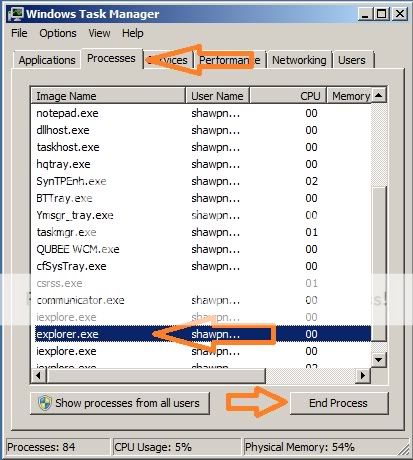
1. Start Task Manager
2. Click on Processes Tab
3. Select Explorer.exe

Make sure the disk is not full or write-protected

4. Click on "End Process" - Now your every window will be closed
5. Do not close the Task Manager
6. Now click on File-->New Task (Run..)
7. Now write "Explorer" on Open: input box
8. Now click on OK
9. Now one window is open - browse the problematic file and delete the file normally

Hope your problem will be resolved.

Tuesday, May 17, 2011

Make Regular Expression Checker in 10 minutes using Asp.net C#


Please visit my new Web Site https://coderstechzone.com


In most of the times we need to make or create a regular expression to find matching patterns from a given string or a file. Many languages support this feature like Javascript and also Asp.net C#. Regular expresion makes our life easy. Few days ago i have done a dataminig project where i found that how much necessary the regular expression is. I understand its power and capability. The developer who wants to learn regular expression then first gather some knowledge on regular expression and then use this easy and simple tool to test the pattern matches.It will definitely increases your confidence as well as skills on Regular Expression. So the regular expression example in back & forth.

The output looks like:
Regular Expression Checker

Design the UI in the following way:
<table border="0">
        <tr>
            <td>Regular Expression: </td><td><asp:TextBox ID="txtExp" runat="server" Width="200px"></asp:TextBox></td>
        </tr>
        <tr>
            <td>Contents: </td><td><asp:TextBox ID="txtContent" runat="server" Columns="40" TextMode="MultiLine" Rows="5"></asp:TextBox></td>
        </tr>
        <tr>
            <td>Result: </td><td><asp:TextBox ID="txtResult" runat="server" Width="200px"></asp:TextBox></td>
        </tr>
        <tr>
            <td></td><td><asp:Button ID="cmdExecute" runat="server" Text="Execute" OnClick="cmdExecute_Click" /></td>
        </tr>
    </table>
Now under Execute button click event write the following server code:
protected void cmdExecute_Click(object sender, EventArgs e)
    {
        string content = txtContent.Text;
        string pattern = txtExp.Text;
        MatchCollection mc = Regex.Matches(content, pattern);
        string sWord = "";
        if (mc.Count > 0)
        {
            for (int i = 0; i < mc.Count; i++)
            {
                if (sWord.Length == 0)
                    sWord = mc[i].Value;
                else
                    sWord =sWord+ ","+ mc[i].Value;
            }
        }
        txtResult.Text = sWord;
    }
Hope now you can test regular expressions in many different ways.

Wednesday, May 11, 2011

Create generate on the fly JQuery dynamic content


Please visit my new Web Site https://coderstechzone.com


In many cases developers need to add dynamic contents in a DIV. In my lattest project i have done a critical job. In this post i am sharing just a simple example on how to add dynamic contents in a DIV. By following this example you can generate on the fly dynamic contents, controls like Button, Link etc. The output look like below:

Jquery Dynamic Content


To do this fisrt add an asp.net aspx page. Then paste the below code under body tag:
<asp:Button ID="Button1" runat="server" Text="Add Dynamic Contents" />
    <div id="divDynamic">
    </div>
Now under head tag paste the below JQuery code:
<script type="text/javascript">
        $(document).ready(function() {
            $("#Button1").click(function() {               
                $("#divDynamic").append("<b>This is a dynamic content--JQUERY</b></br>");
                return false;
            });
        });
    </script>

The complete code will be:
<%@ Page Language="C#" AutoEventWireup="true" CodeFile="Dynamincontents_jquery.aspx.cs" Inherits="Dynamincontents_jquery" %>

<!DOCTYPE html PUBLIC "-//W3C//DTD XHTML 1.0 Transitional//EN" "http://www.w3.org/TR/xhtml1/DTD/xhtml1-transitional.dtd">

<html xmlns="http://www.w3.org/1999/xhtml" >
<head runat="server">
    <title>Jquery to add dynamic contents in a DIV</title>
    <script src="Script/jquery.js" type="text/javascript"></script>
    
    <script type="text/javascript">
        $(document).ready(function() {
            $("#Button1").click(function() {               
                $("#divDynamic").append("<b>This is a dynamic content--JQUERY</b></br>");
                return false;
            });
        });
    </script>
        
</head>
<body>
    <form id="form1" runat="server">
    <div>
    
    <asp:Button ID="Button1" runat="server" Text="Add Dynamic Contents" />
    <div id="divDynamic">
    </div>
    
    </div>
    </form>
</body>
</html>
Now hope one can generate dynamic contents by using JQuery power script.

Sunday, March 27, 2011

Validate XML aganist an XSD in Asp.Net C#


Please visit my new Web Site https://coderstechzone.com


Most of the times when we are working with XML we need to validate the XML file from an XSD file. Here i am showing an code example how one can validate XML file using an XSD in Asp.Net C#.

To do that add an aspx page in your project.


Now under Page_Load event write the below code:
using System;
using System.Xml;
using System.Text;
using System.Xml.Schema;

public partial class Validate_XML_XSD : System.Web.UI.Page
{
    private StringBuilder sB = new StringBuilder();
    protected void Page_Load(object sender, EventArgs e)
    {
        if (!IsPostBack)
        {
            string xmlPath = MapPath("MenuXML.xml");
            string xsdPath = MapPath("MenuXML.xsd");

            XmlReaderSettings settings = new XmlReaderSettings();
            settings.ValidationType = ValidationType.Schema;
            settings.Schemas.Add(null, XmlReader.Create(xsdPath));

            XmlReader Oreader = XmlReader.Create(xmlPath, settings);
            XmlDocument Odoc = new XmlDocument();
            Odoc.Load(Oreader);
            ValidationEventHandler eventHandler = new ValidationEventHandler(ValidationEventHandler);

            Odoc.Validate(eventHandler);
            if (sB.ToString() == String.Empty)
                Response.Write("Validation completed successfully.");
            else
                Response.Write("Validation Failed: " + sB.ToString());
        }
    }

    public void ValidationEventHandler(object sender, ValidationEventArgs args)
    {
        sB.Append("Error: " + args.Message);
    }  
}

Hope now you can validate XML file easily.

Creating XSD file from an XML file in Asp.Net within few seconds


Please visit my new Web Site https://coderstechzone.com


There are a lot of tools in the internet you will get to create XSD file from an XML file but you need to download then install or may be convert on-line. But there is good news that Asp.Net has built in menu to create XSD file from an XML file.


To do that first write the below XML file in VisualStudio:
<?xml version="1.0" encoding="utf-8" ?>
<Home>
  <Menu text="Books" url="MenuFromXml.aspx">
    <SubMenu text="Asp.Net" url="MenuFromXml.aspx"></SubMenu>
    <SubMenu text="Ajax" url="MenuFromXml.aspx"></SubMenu>
    <SubMenu text="MS SQL Server 2005" url="MenuFromXml.aspx"></SubMenu>
    <SubMenu text="JavaScript" url="MenuFromXml.aspx"></SubMenu>
  </Menu>
  <Menu text="Electronics"  url="MenuFromXml.aspx">
    <SubMenu text="Camera" url="MenuFromXml.aspx">
      <SubMenu text="Digital" url="MenuFromXml.aspx">
        <SubMenu text="Canon" url="MenuFromXml.aspx"></SubMenu>
        <SubMenu text="Kodak" url="MenuFromXml.aspx"></SubMenu>
        <SubMenu text="Sony" url="MenuFromXml.aspx"></SubMenu>
        <SubMenu text="Casio" url="MenuFromXml.aspx"></SubMenu>
        <SubMenu text="Fuji" url="MenuFromXml.aspx"></SubMenu>
      </SubMenu>
      <SubMenu text="Film Camera" url="MenuFromXml.aspx"></SubMenu>
    </SubMenu>
    <SubMenu text="DVDs" url="MenuFromXml.aspx">
      <SubMenu text="Comedy" url="MenuFromXml.aspx">
        <SubMenu text="English" url="MenuFromXml.aspx"></SubMenu>
        <SubMenu text="French" url="MenuFromXml.aspx"></SubMenu>
        <SubMenu text="German" url="MenuFromXml.aspx"></SubMenu>
        <SubMenu text="Spanish" url="MenuFromXml.aspx"></SubMenu>
      </SubMenu>
      <SubMenu text="Kids Movies" url="MenuFromXml.aspx"></SubMenu>
      <SubMenu text="Romance Movies" url="MenuFromXml.aspx"></SubMenu>
      <SubMenu text="Action Movies" url="MenuFromXml.aspx"></SubMenu>
    </SubMenu>
  </Menu>
  <Menu text="Contact Us" url="MenuFromXml.aspx"></Menu>
</Home>

Now you found a menu named "XML" in VS Main menu. View:

Now click on Create schema will create the below XSD file:
<?xml version="1.0" encoding="utf-8"?>
<xs:schema attributeFormDefault="unqualified" elementFormDefault="qualified" xmlns:xs="http://www.w3.org/2001/XMLSchema">
  <xs:element name="Home">
    <xs:complexType>
      <xs:sequence>
        <xs:element maxOccurs="unbounded" name="Menu">
          <xs:complexType>
            <xs:sequence minOccurs="0">
              <xs:element maxOccurs="unbounded" name="SubMenu">
                <xs:complexType>
                  <xs:sequence minOccurs="0">
                    <xs:element maxOccurs="unbounded" name="SubMenu">
                      <xs:complexType>
                        <xs:sequence minOccurs="0">
                          <xs:element maxOccurs="unbounded" name="SubMenu">
                            <xs:complexType>
                              <xs:attribute name="text" type="xs:string" use="required" />
                              <xs:attribute name="url" type="xs:string" use="required" />
                            </xs:complexType>
                          </xs:element>
                        </xs:sequence>
                        <xs:attribute name="text" type="xs:string" use="required" />
                        <xs:attribute name="url" type="xs:string" use="required" />
                      </xs:complexType>
                    </xs:element>
                  </xs:sequence>
                  <xs:attribute name="text" type="xs:string" use="required" />
                  <xs:attribute name="url" type="xs:string" use="required" />
                </xs:complexType>
              </xs:element>
            </xs:sequence>
            <xs:attribute name="text" type="xs:string" use="required" />
            <xs:attribute name="url" type="xs:string" use="required" />
          </xs:complexType>
        </xs:element>
      </xs:sequence>
    </xs:complexType>
  </xs:element>
</xs:schema>

Wow done wthin few seconds.
Want To Search More?
Google Search on Internet
Subscribe RSS Subscribe RSS
Article Categories
  • Asp.net
  • Gridview
  • Javascript
  • AJAX
  • Sql server
  • XML
  • CSS
  • Free Web Site Templates
  • Free Desktop Wallpapers
  • TopOfBlogs
     
    Free ASP.NET articles,C#.NET,VB.NET tutorials and Examples,Ajax,SQL Server,Javascript,Jquery,XML,GridView Articles and code examples -- by Shawpnendu Bikash