Showing posts with label sql server. Show all posts

Friday, April 6, 2012

How to get SP Trigger View code from query analyzer in SQL Server


Please visit my new Web Site https://coderstechzone.com


Sometimes upstream (place to collect data) or your vendor may give you the permission on some Stored Procedure or Trigger or View or even you may have not SQL management Studio or you may can not view those in Management studio. So at that moment how one can view the code. The solution is simple. Use builtin sp_helptext.

Sample Output Screenshot:

View SP Code by TSQL

Syntax:
sp_helptext 'your sp/view/trigger name'
Example:
Lets say i have a stored procedure named TestProcedure then the TSQL will be:
sp_helptext 'TestProcedure'
Hope it will helps.

Thursday, March 1, 2012

How to get week number from a date in SQL Server


Please visit my new Web Site https://coderstechzone.com


As a developer i beleive that most of the times we need to built our query based on date column. Some times we need to get or find out the week number from a given date. Sql server provides us such an easy way to find out the week number from a date. The function is DATEPART. By using DATEPART function we can calculate week number easily. Please follow my example code to achieve the expected result.

Sample Output:
TSQL_DATEPART Function Example


To run the example find the following code:
CREATE TABLE [dbo].[Employee]
(
 [ID] [int] NULL,
 [Name] [varchar](200) NULL,
 [JoiningDate] [smalldatetime] NULL
)

INSERT INTO EMPLOYEE VALUES(1,'Shawpnendu','Jan 01, 2012')
INSERT INTO EMPLOYEE VALUES(2,'Bimalandu','Jan 10, 2012')
INSERT INTO EMPLOYEE VALUES(3,'Purnendu','Jan 20, 2012')
INSERT INTO EMPLOYEE VALUES(4,'Amalendu','Jan 30, 2012')
INSERT INTO EMPLOYEE VALUES(5,'Chadbindu','Feb 05, 2012')

SELECT *,DATEPART(wk,JoiningDate) [Week Number] FROM EMPLOYEE

Hope now you can retrieve week number from a given date using DATEPART TSQL function.

Wednesday, December 7, 2011

The OLE DB provider 'SQLOLEDB' was unable to begin a distributed transaction : SQL SERVER ERROR


Please visit my new Web Site https://coderstechzone.com


In many Sql Server forum i found the error "The operation could not be performed because the OLE DB provider 'SQLOLEDB' was unable to begin a distributed transaction". That's why i am decided to describe this error with a solution that i have resolved yesterday. One simple solution is Sql Server has a service named "Distributed Transaction" which you need to ON to resolve this problem. But one disadvantage of this service is it will take memory space than usual. You have another simple solution which i want to share in the later part of this article.

Full Error:
[OLE/DB provider returned message: New transaction cannot enlist in the specified transaction coordinator. ]
OLE DB error trace [OLE/DB Provider 'SQLOLEDB' ITransactionJoin::JoinTransaction returned 0x8004d00a].
Msg 7391, Level 16, State 1, Line 19
The operation could not be performed because the OLE DB provider 'SQLOLEDB' was unable to begin a distributed transaction.

Reason:
Specially i found this error when i am trying to run a dynamic query to insert data into another server like below:
DECLARE @tbl VARCHAR(8)
SELECT @tbl=CONVERT(VARCHAR(8),DATEADD(day, (DATEDIFF (day, '19800104', getdate()) / 7) * 7, '19800104'),112)

DECLARE @sql nvarchar(2000);

SET @sql='select 
 account_id,
 sum(case when account_balance >=0  and account_balance <99 then 1 else 0 end) b_0to99,
 sum(case when account_balance >=100  and account_balance <499 then 1 else 0 end) b_100to499,
 sum(case when account_balance >=500  and account_balance <999 then 1 else 0 end) b_500to999,
 sum(case when account_balance >1000  then 1 else 0 end) b_g1000
from
 sdp_dedicated_stage_'+ @tbl +'
group by account_id
order by convert(integer,account_id)'

INSERT INTO [SQLDB\SQL100].[RA_CTL_SUMMARY].[dbo].FM_DA_TREND_ANALYSIS
EXEC SP_EXECUTESQL @sql

DROP TABLE #tmpDA
Solution:
First create a table definition within the scope and insert dynamic sql returned data into this table and then insert data into the remote server or another server table like below:
DECLARE @tbl VARCHAR(8)
SELECT @tbl=CONVERT(VARCHAR(8),DATEADD(day, (DATEDIFF (day, '19800104', getdate()) / 7) * 7, '19800104'),112)

CREATE TABLE #tmpDA(account_id int,b_0to99 bigint,b_100to499 bigint,b_500to999 bigint,b_g1000 bigint)

DECLARE @sql nvarchar(2000);

SET @sql='select 
 account_id,
 sum(case when account_balance >=0  and account_balance <99 then 1 else 0 end) b_0to99,
 sum(case when account_balance >=100  and account_balance <499 then 1 else 0 end) b_100to499,
 sum(case when account_balance >=500  and account_balance <999 then 1 else 0 end) b_500to999,
 sum(case when account_balance >1000  then 1 else 0 end) b_g1000
from
 sdp_dedicated_stage_'+ @tbl +'
group by account_id
order by convert(integer,account_id)'

INSERT #tmpDA
EXEC SP_EXECUTESQL @sql

INSERT INTO [SQLDB\SQL100].[RA_CTL_SUMMARY].[dbo].FM_DA_TREND_ANALYSIS
SELECT *,@tbl FROM #tmpDA

DROP TABLE #tmpDA
If you examine the code you will found that i have created a table definition named #tmpDA then i have inserted dynamic sql returned data into the #tmpDA table, after that i have inserted #tmpDA data into the remote server [SQLDB\SQL100]. The problem has been resolved.

Wednesday, November 3, 2010

How to use optional parameter in SQL server SP


Please visit my new Web Site https://coderstechzone.com


When you are going to write a generic SP for any business purpose you may realize the necessity of optional parameter. Yes Sql server gives us the opportunity to use optional parameter in SP arguments. You may write a SP with 3 arguments but based on your business rule you may pass one or two or three valuse as you want. This policy not only ease our life but also help us to write short SP. Here in this article i will discuss how one can create a optional list SP & execute thie SP or stored procedure.


Ok first write a SP with two optional field like below:
ALTER procedure Optional_Procedur 
@Name varchar(200)=null,
@Age int=null
As
BEGIN
if @Name is not null  
 print 'Your Name Is '+@Name
if @Age is not null
 print 'Your Age '+Convert(varchar(3),@Age)
END

Now you can call the SP in many different ways like:
exec Optional_Procedur 'Shawpnendu'
print '-----------------------------'
exec Optional_Procedur 'Shawpnendu',32
print '-----------------------------'
exec Optional_Procedur @Name='Shawpnendu'
print '-----------------------------'
exec Optional_Procedur @Age=32


The query output is given below:

Your Name Is Shawpnendu
-----------------------------
Your Name Is Shawpnendu
Your Age 32
-----------------------------
Your Name Is Shawpnendu
-----------------------------
Your Age 32

I.E. You can send parameter specific values or sequential values or you are not bound to send parameter values in this regard.

Monday, November 1, 2010

Error: 'object could not be found' or 'invalid object name'?


Please visit my new Web Site https://coderstechzone.com


As a Developer i thought you may experience one of two errors frequently, even though you thought the object already exist. The error like below:

Msg 208, Level 16, State 1, Line 1
Invalid object name 'Table/View Name'.

OR

Msg 2812, Level 16, State 62, Line 1
Could not find stored procedure ''.


Solution:
To Avoid Such type of error keep in mind always the following considerations:

1. The connecting user does not have SELECT, UPDATE, INSERT, DELETE, EXEC permissions on that object/objects.

2. your are logging/connecting as a different user that you have expected.

3. Referencing the object without an owner name prefix may raise this error;

4. your connected database is wrong;

5. May be you have written wrong object name or spelled incorrectly.

How to determine whether a table is exist or not in Sql Server database


Please visit my new Web Site https://coderstechzone.com


In some cases we need to identify whether a table is exist or not in a sql server database. This is very simple & now i am sharing with you. Hope it will works like a handbook for you.


Query:
IF EXISTS (SELECT 1 
    FROM INFORMATION_SCHEMA.TABLES 
    WHERE TABLE_TYPE='BASE TABLE' 
    AND TABLE_NAME='tablename') 
        SELECT 'table exists.' 
ELSE 
        SELECT 'table does not exist.'

Hope it will help you.

Monday, August 2, 2010

Syntax of Shrinking SQL Server database mdf and log file


Please visit my new Web Site https://coderstechzone.com


The below code snippet will help you to shrink the database. Run the code snippet through your SQL Server query analyser.


backup log <database_name> with truncate_only 
use <database_name> 
dbcc SHRINKFILE (<database_name_Log>,2) 
dbcc ShrinkDatabase (<database_name>, 2)

Thursday, May 13, 2010

Error: The text, ntext, and image data types cannot be compared or sorted, except when using IS NULL or LIKE operator


Please visit my new Web Site https://coderstechzone.com


When you google this error you will get a lots of solution. But no one help me to resolve my problem. So i am working on this issue to find out my solution & finally i got a simple problem which i want to share with you. My situation is i have a link server (SQL Server 2008) with my working Sql server 2005. I have created a table in the link server means Sql server 2008 which is given below:

Sql Server Table

And i wrote a sample stored procedure with a dynamic SQL to produce this error like below:
CREATE PROCEDURE SP_Test
@Table_Tail AS VARCHAR(20)
AS
BEGIN
 SET NOCOUNT ON;
 DECLARE @STRSQL AS VARCHAR(5000)

 SET @STRSQL = 'DELETE FROM [xxxxx\SQL01].[RA_CTL_SUMMARY].dbo.TBL_IBSPhase2 WHERE EntryDate='''+@Table_Tail+''' 
 AND Prefix=''NOKIA'' '
 EXEC (@STRSQL) 

END

The problem is when i want to run or execute this query i will get the below error:
Msg 306, Level 16, State 1, Line 1
The text, ntext, and image data types cannot be compared or sorted, except when using IS NULL or LIKE operator.

Solution:
In this case the solution is simple. Just change the datatype size of column Prefix MAX to a fixed size will resolved my problem. Means in my scenario i have declared the datatype of Prefix column from VARCHAR(MAX) to VARCHAR(5000).

In your case this may not be the situation so keep googling & try other solutions. This is one of the solution only which i did not get from google.

Tuesday, March 2, 2010

Set a database to read only mode using SQL Server 2005 / 2008


Please visit my new Web Site https://coderstechzone.com


In most DBA or Database Administration purpose we need to set a Database to readonly mode. Here i will show you how you can set Database in Read Only mode for Sql server 2005 & Sql Server 2008. One thing keep in mind that you can not use same sql command for both sql server 2005 and 2008. Thats why here i will show the different ways to manage a Database to Read Only mode.

The another important note is you can not make a database read only until you set the Database in single user mode. So first set the database in single user mode. Click here to read how to set Database as single user mode.


Sql Server 2005:
Now run the below command:
EXEC sp_dboption "YourDatabaseName", "read only", "True";
After executing the above command then refresh the database. You will see that the DataBase now set to Read Only mode like below:


Now if anyone try to enter or update a data into the database he will receive the below error:
Error Message: Failed to update database "DataBaseName" because the Databse is read-only.


Now to remove the read-only mode run the below sql:
EXEC sp_dboption "YourDatabaseName", "read only", "False";

Sql Server 2008:
To make the Database read only in 2008 run the below SQL:
USE master;

GO

ALTER DATABASE databasename
SET READ_ONLY;

GO

Hope now you can perform DBA role.

Thursday, February 25, 2010

Kick expire close all user connection from Sql Server 2005 / 2008 Database


Please visit my new Web Site https://coderstechzone.com


In some cases DBA's need to expire or close all connections from SQL server 2005 / SQL server 2008 database such as for attach detach DataBase, Make DB readonly, perform maintenance tasks etc. For such type of issues DBA wants to get exclusive access to the database. To do so, you can set the database to Single User Mode, which permits only one database connection at a time. At that moment if other users try to access the database while you are working on that active connection, they will receive an error.


To bring a database to the single user mode, use the following query:
ALTER DATABASE DATABASENAME SET SINGLE_USER

Users those already connected to the db when you run this command, they will not be disconnected. Instead the 'SET SINGLE_USER' command will wait till the others have disconnected. If you want to override this scenario and forcefully disconnect other users, then use the following query:
ALTER DATABASE DATABASENAME SET SINGLE_USER WITH ROLLBACK IMMEDIATE

OK now your database immediately move to the single user mode. Now After completion of your maintenance task you need to go back to multiuser mode by applying another TSQL command which is given below:
ALTER DATABASE DATABASENAME SET MULTI_USER

So now hope you can gain quick access in your database by applying the above TSQL command.

Tuesday, January 5, 2010

Creating RSS feed using Asp.Net 2.0 / 3.5


Please visit my new Web Site https://coderstechzone.com


RSS means Really Simple Syndication which is a Web content syndication format.

If you are looking for "Read/Consume RSS feed" article then click here.

Now let’s try to find out what RSS is about. Basically the website owner should return a RSS feed - and that's simply an XML document following a certain standard, describing new or latest articles on your site. When one copy your feeds & read it by a reader like goggle reader then reader get an overview of your latest articles. If reader wants to read details lets "How to make or create RSS Feed using Asp.net" then the reader will click on your Creating RSS Feed link which will redirect the user to your site.

So i hope now you can understand why Creating RSS feed is necessary for website or blog owner. In blog we will get RSS feed by default but for website you must need to create or make RSS feed for your regular readers so that all times they won’t visit your website to read your latest articles.

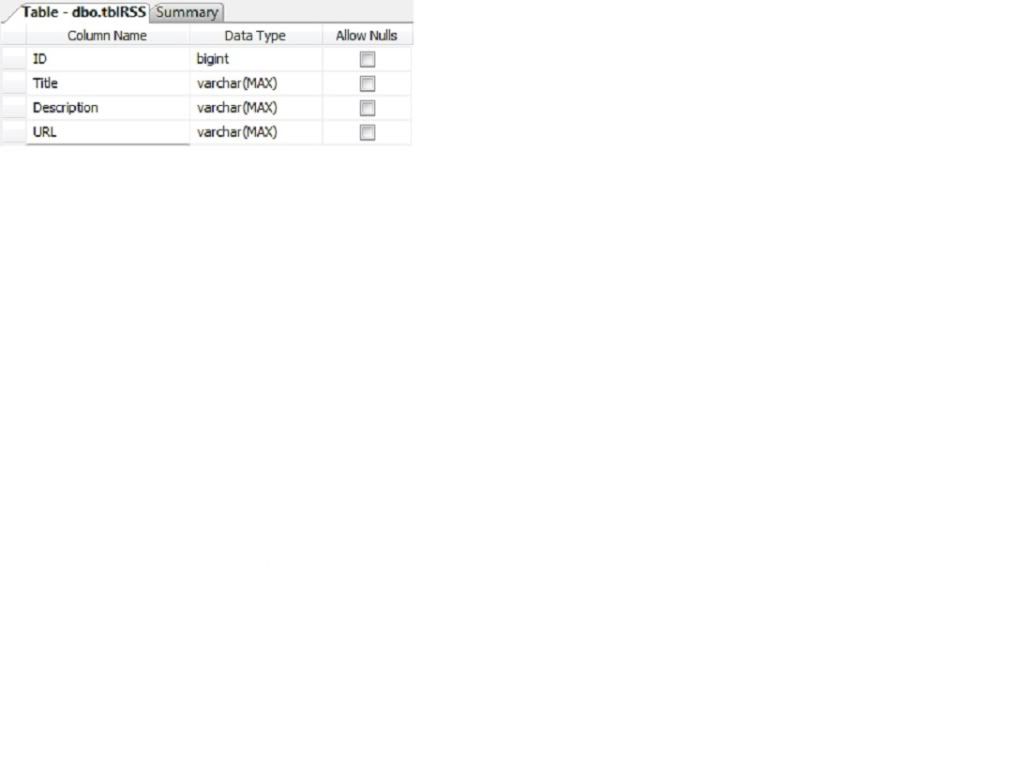
In most cases developers Create RSS feed from database. That’s why I will show you the way how we can achieve it. Since you are making or creating RSS feed from database so that you can Dynamically or Runtime create RSS feed from your aspx page. To do that first create the below table:


Fig: Table Structure

Enter some data like:


Fig: Sample data

Now create a new web site. Rename the default.aspx page to CreateRSS.aspx. Now open the CreateRSS.aspx page and add the below line just after the first line of the page:
<%@ Page Language="C#" AutoEventWireup="true"  CodeFile="CreateRSS.aspx.cs" Inherits="_Default" %>
<%@ OutputCache Duration="120" VaryByParam="*" %>
Now go to code behind & write the code under page load event to dynamically create RSS feed using Asp.Net:
using System;
using System.Data;
using System.Configuration;
using System.Data.SqlClient;
using System.Text;
using System.Xml;

public partial class _Default : System.Web.UI.Page 
{
    protected void Page_Load(object sender, EventArgs e)
    {
        string connectionString = ConfigurationManager.ConnectionStrings["TestConnection"].ConnectionString;
        DataTable dt = new DataTable();
        SqlConnection conn = new SqlConnection(connectionString);
        using (conn)
        {
            SqlDataAdapter ad = new SqlDataAdapter("SELECT * from tblRSS", conn);
            ad.Fill(dt);
        }

        Response.Clear();
        Response.ContentType = "text/xml";
        XmlTextWriter TextWriter = new XmlTextWriter(Response.OutputStream, Encoding.UTF8);
        TextWriter.WriteStartDocument();
        
        //Below tags are mandatory rss tag
        TextWriter.WriteStartElement("rss");
        TextWriter.WriteAttributeString("version", "2.0");

        // Channel tag will contain RSS feed details
        TextWriter.WriteStartElement("channel");
        TextWriter.WriteElementString("title", ".Net Mixer Free Articles");
        TextWriter.WriteElementString("link", "http://shawpnendu.blogspot.com");
        TextWriter.WriteElementString("description", "Free ASP.NET articles,C#.NET,VB.NET tutorials and Examples,Ajax,SQL Server,Javascript,XML,GridView Articles and code examples -- by Shawpnendu Bikash");
        TextWriter.WriteElementString("copyright", "Copyright 2009 - 2010 shawpnendu.blogspot.com. All rights reserved.");

        foreach (DataRow oFeedItem in dt.Rows)
        {
            TextWriter.WriteStartElement("item");
            TextWriter.WriteElementString("title", oFeedItem["Title"].ToString());
            TextWriter.WriteElementString("description", oFeedItem["Description"].ToString());
            TextWriter.WriteElementString("link", oFeedItem["URL"].ToString());
            TextWriter.WriteEndElement();
        }
        TextWriter.WriteEndElement();
        TextWriter.WriteEndElement();
        TextWriter.WriteEndDocument();
        TextWriter.Flush();
        TextWriter.Close();
        Response.End();
    }
}
Now build the project & run it hope you will get an output like below:
Create_RSS_output
So now i hope that you can runtime create RSS feed in asp.net application without help of others. In my next article i will show you how you can Read/Consume RSS feed in your asp.net aspx page.

There are more useful tags which you can use to create the RSS feed, such as the author, category or an unique ID. You found more information on Creating RSS Feed in the RSS 2.0 specification page.

Thursday, December 31, 2009

Display Images in GridView from Sql Server Database Table Using Asp.net C#


Please visit my new Web Site https://coderstechzone.com


In my previous post i showed you "How one can upload images into Sql Server using Asp.net C# FileUpload control". In this post i will show you how one can display images into a GridView from Sql Server table. As you know in most of the web applications requires to handle different type of images like large,thumbnail etc. If those web applications are e-commerce site then you must be carefull when handling images. In previous post i showed how you can store images & in this post i will show you how one can display images from Sql server table. The table structure is given below:


Fig: Table structure

Displaying picture or image in a GridView is a different way then just using a image tag. In ASP.NET we can define a Handler to access the image from data base. So now we need to create a Handler to read binary data from database. To do that Right click on solution explorer and Add new item, click on Generic Handler and name it ImageHandler.ashx. Write this code in ProcessRequest method:
using System;
using System.Web;
using System.Data.SqlClient;
using System.Configuration;
using System.Data;

public class ImageHandler : IHttpHandler 
{
    
    public void ProcessRequest (HttpContext context) 
    {
        string connectionString = ConfigurationManager.ConnectionStrings["TestConnection"].ConnectionString;
        SqlConnection conn = new SqlConnection(connectionString);
        SqlCommand cmd = new SqlCommand();
        cmd.CommandText = "Select [Content] from Images where ID =@ID";
        cmd.CommandType = CommandType.Text;
        cmd.Connection = conn;

        SqlParameter ImageID = new SqlParameter("@ID", SqlDbType.BigInt);
        ImageID.Value = context.Request.QueryString["ID"];
        cmd.Parameters.Add(ImageID);
        conn.Open();
        SqlDataReader dReader = cmd.ExecuteReader();
        dReader.Read();
        context.Response.BinaryWrite((byte[])dReader["Content"]);
        dReader.Close();
        conn.Close();
    }
 
    public bool IsReusable {
        get {
            return false;
        }
    }
}
Ok now add an aspx page in your project. Add a GridView control with a template field. Within the template field define image URL like below:
<%@ Page Language="C#" AutoEventWireup="true" CodeFile="Display_images.aspx.cs" Inherits="Display_images" %>

<!DOCTYPE html PUBLIC "-//W3C//DTD XHTML 1.0 Transitional//EN" "http://www.w3.org/TR/xhtml1/DTD/xhtml1-transitional.dtd">

<html xmlns="http://www.w3.org/1999/xhtml" >
<head runat="server">
    <title>Display Images in GridView from SQL Server</title>
</head>
<body>
    <form id="form1" runat="server">
    <div>
        
        <asp:GridView ID="GVImages" runat="server" AutoGenerateColumns="false" HeaderStyle-BackColor="red" HeaderStyle-ForeColor="white">
        <Columns>
    
        <asp:BoundField DataField="ID" HeaderText="ID" />
        <asp:BoundField DataField="Name" HeaderText="Description" />
        <asp:BoundField DataField="Type" HeaderText="Type" />
    
        <asp:TemplateField HeaderText="Image">
        <ItemTemplate>
        <asp:Image ID="Image1" runat="server" 
                   ImageUrl='<%# "ImageHandler.ashx?ID=" + Eval("ID")%>'/>
        </ItemTemplate>
        </asp:TemplateField>
    
        </Columns>        
        </asp:GridView>
    
    </div>
    </form>
</body>
</html>
Now everything is set except binding sql server data into the GridView. To do that write the below code in Page_Load event:
using System;
using System.Data;
using System.Configuration;
using System.Web;
using System.Web.UI;
using System.Data.SqlClient;

public partial class Display_images : System.Web.UI.Page
{
    protected void Page_Load(object sender, EventArgs e)
    {
        if (!IsPostBack)
        {
            string connectionString = ConfigurationManager.ConnectionStrings["TestConnection"].ConnectionString;
            DataTable dt = new DataTable();
            SqlConnection conn = new SqlConnection(connectionString);
            using (conn)
            {
                SqlDataAdapter ad = new SqlDataAdapter("SELECT * FROM Images", conn);
                ad.Fill(dt);
            }
            GVImages.DataSource = dt;
            GVImages.DataBind();
        }
    }
}
Now run the project & hope you wil get a webpage like below:


Fig: Sample Output

So i think now you can display images from sql server table into a GridView. Happy programming.

Wednesday, December 30, 2009

Save Images into Sql Server Database Table using asp.net FileUpload Control


Please visit my new Web Site https://coderstechzone.com


This article will explain how one can insert or save images into a sql server database table using asp.net FileUpload control. You may ask why we will save or store images into sql server database table instead of a server folder? The answer is its easy to use, easy to manage, easy to backup as well as easy programming. But one thing you have to keep in mind that you need to extend the size of your database rather than your regular size. Always deleting images from server folder is a hectic job where security will play a great role but if you store images into sql server database you can remove images or related images by issuing a simple delete sql command.

If you want to upload images into server folder then click here.

If you want to display images from server folder into datalist then click here.

To start to explain how to store images into sql server database  or Upload images into sql server first create a below like table:


Where ID is the identity field which you will use as a foreign key when entering details data like products_images. In products_images you can easily use imageid as a thumbnail image or large image. The table columns for products_images may like ProductID, ImageType & ImageID.

Now add a webpage in your project and named it Save_Images.aspx then copy the HTML Markup code from below:
<%@ Page Language="C#" AutoEventWireup="true" CodeFile="Save_Images.aspx.cs" Inherits="Save_Images" %>

<!DOCTYPE html PUBLIC "-//W3C//DTD XHTML 1.0 Transitional//EN" "http://www.w3.org/TR/xhtml1/DTD/xhtml1-transitional.dtd">

<html xmlns="http://www.w3.org/1999/xhtml" >
<head runat="server">
    <title>How to save images into sql server database</title>
</head>
<body>
    <form id="form1" runat="server">
    <div>

        Name:        
        <asp:TextBox runat="server" ID="txt_Image_Name"></asp:TextBox><br />    
        Image Path:
        <asp:FileUpload runat="server" ID="FileUpload1" /><br /><br />
        <asp:Button runat="server" ID="cmd_Upload" Text="Upload Image" OnClick="cmd_Upload_Click" />

    </div>
    </form>
</body>
</html>

Your page will look like below:


Now under cmd_Upload button write the below server side code. For your better understanding i have put full code here:
using System;
using System.Data;
using System.Configuration;
using System.Web;
using System.Data.SqlClient;

public partial class Save_Images : System.Web.UI.Page
{
    protected void Page_Load(object sender, EventArgs e)
    {

    }
    protected void cmd_Upload_Click(object sender, EventArgs e)
    {
        string s_Image_Name = txt_Image_Name.Text.ToString();
        if (FileUpload1.PostedFile != null && FileUpload1.PostedFile.FileName != "")
        {
            byte[] n_Image_Size = new byte [FileUpload1.PostedFile.ContentLength];
            HttpPostedFile Posted_Image = FileUpload1.PostedFile;
            Posted_Image.InputStream.Read(n_Image_Size, 0, (int)FileUpload1.PostedFile.ContentLength);

            SqlConnection conn = new SqlConnection(ConfigurationManager.ConnectionStrings["TestConnection"].ConnectionString);

            SqlCommand cmd = new SqlCommand();
            cmd.CommandText = "INSERT INTO Images(Name,[Content],Size,Type)" +
                              " VALUES (@Image_Name,@Image_Content,@Image_Size,@Image_Type)";
            cmd.CommandType = CommandType.Text;
            cmd.Connection = conn;

            SqlParameter Image_Name = new SqlParameter("@Image_Name", SqlDbType.VarChar, 500);
            Image_Name.Value = txt_Image_Name.Text;
            cmd.Parameters.Add(Image_Name);

            SqlParameter Image_Content = new SqlParameter("@Image_Content", SqlDbType.Image, n_Image_Size.Length);
            Image_Content.Value = n_Image_Size;
            cmd.Parameters.Add(Image_Content);

            SqlParameter Image_Size = new SqlParameter("@Image_Size", SqlDbType.BigInt, 99999);
            Image_Size.Value = FileUpload1.PostedFile.ContentLength;
            cmd.Parameters.Add(Image_Size);

            SqlParameter Image_Type = new SqlParameter("@Image_Type", SqlDbType.VarChar, 500);
            Image_Type.Value = FileUpload1.PostedFile.ContentType;
            cmd.Parameters.Add(Image_Type);


            conn.Open();
            cmd.ExecuteNonQuery();
            conn.Close();
        }
    }
}
Now run your page give a name for your image. Then select an image to upload. For multiple upload you may read my another post CLICK HERE. Click on upload. Hope your image will be successfully uploaded. Go to the SqlServer andopen the images table. You will get a scenario like below:


So now i hope you can upload images into your sql server using FileUpload Asp.net control. In my next article i will show you how one can retrieve images from Sql Server into a GridView/DataList/Repeater control.

Tuesday, December 8, 2009

Javascript to get CheckBoxList value


Please visit my new Web Site https://coderstechzone.com


To read CheckBoxList Selected Value, Selected Index & Selected Text in serverside is an easy job but using javascript its a bit difficult. In this article i want to share with you how one can read CheckBoxList SelectedValue, SelectedIndex & SelectedText by using javascript. Before explanation i want to share with you that getting SelectedIndex & SelectedText from javascript is a bit easy rather than SelectedValue because there is no direct way to read SelectedValue from CheckBoxList. To do that you have to work a bit hard like in databound time of CheckBoxList you have to add an attribute named ALT as value. Then from checkbox array you can read the ALT value as SelectedValue. There is no easy alternative not found yet. If you do not want to read Selected Value of CheckBoxList then please remove the CheckBoxList1_DataBound method from server side code that i will show you later. Also remove variable spanArray, sValue & its related lines from javascript.

If you are looking for Jquery solution then CLICK HERE.

Focus Area:
1. How to get SelectedValue from CheckBoxList using javascript.
2. How to get SelectedText from CheckBoxList using javascript.
3. How to get SelectedIndex from CheckBoxList using javascript.
4. How to bind sql server data into CheckBoxList using Asp.net.


To do that first of all create a table like below:


Here i am considering that the table name is Article. Now add an aspx page in your project and write the HTML Markup like below:
<%@ Page Language="C#" AutoEventWireup="true" CodeFile="Javascript_Checkbox.aspx.cs" Inherits="Javascript_Checkbox" %>

<!DOCTYPE html PUBLIC "-//W3C//DTD XHTML 1.0 Transitional//EN" "http://www.w3.org/TR/xhtml1/DTD/xhtml1-transitional.dtd">

<html xmlns="http://www.w3.org/1999/xhtml" >
<head runat="server">
<title>Javascript Selectted Item From CheckBoxList</title>

<script type="text/javascript">
function Get_Selected_Value()
{
var ControlRef = document.getElementById('<%= CheckBoxList1.ClientID %>');
var CheckBoxListArray = ControlRef.getElementsByTagName('input');
var spanArray=ControlRef.getElementsByTagName('span');
var checkedValues = '';
var nIndex=0;
var sValue='';

for (var i=0; i<CheckBoxListArray.length; i++)
{
var checkBoxRef = CheckBoxListArray[i];

if ( checkBoxRef.checked == true )
{
var labelArray = checkBoxRef.parentNode.getElementsByTagName('label');


if ( labelArray.length > 0 )
{
if ( checkedValues.length > 0 )
{
checkedValues += ', ';
nIndex += ', ';
sValue += ', ';
}
checkedValues += labelArray[0].innerHTML;
nIndex +=i;
sValue +=spanArray[i].alt;
}
}
}
document.getElementById('<%= lbl_SelectedValue.ClientID %>').innerHTML='<b>Selected Value:</b> '+ sValue;
document.getElementById('<%= lbl_SelectedText.ClientID %>').innerHTML='<b>Selected Text:</b> '+checkedValues;
document.getElementById('<%= lbl_SelectedIndex.ClientID %>').innerHTML='<b>Selected Index:</b> '+nIndex;
}
</script>

</head>
<body>
<form id="form1" runat="server">
<div>
<asp:CheckBoxList ID="CheckBoxList1" runat="server" onclick="Get_Selected_Value();" OnDataBound="CheckBoxList1_DataBound">
</asp:CheckBoxList>
<hr />
<label id="lbl_SelectedValue" runat="server"></label><br />
<label id="lbl_SelectedText" runat="server"></label><br />
<label id="lbl_SelectedIndex" runat="server"></label>
</div>
</form>
</body>
</html>

Now in code behind write the serverside code like below:
using System;
using System.Data;
using System.Configuration;
using System.Web.UI.WebControls;
using System.Data.SqlClient;

public partial class Javascript_Checkbox : System.Web.UI.Page
{
protected void Page_Load(object sender, EventArgs e)
{
string connectionString = ConfigurationManager.ConnectionStrings["TestConnection"].ConnectionString;
DataTable dt = new DataTable();
SqlConnection conn = new SqlConnection(connectionString);
using (conn)
{
SqlDataAdapter ad = new SqlDataAdapter(
"SELECT ID,Title from Article", conn);
ad.Fill(dt);
}
CheckBoxList1.DataSource = dt;
CheckBoxList1.DataTextField = "Title";
CheckBoxList1.DataValueField = "ID";
CheckBoxList1.DataBind();
}

protected void CheckBoxList1_DataBound(object sender, EventArgs e)
{
CheckBoxList chkList = (CheckBoxList)(sender);
foreach (ListItem item in chkList.Items)
item.Attributes.Add("alt", item.Value);
}
}

Run the project & you will get an interface like below:


Hope now you can read Selected Value, Selected Text, Selected Index from Asp.net CheckBoxList server control. The SelectedValue may not work in Firefox/Opera. I didn't test yet.

Tuesday, December 1, 2009

The syntax of SQL Server Cursor


Please visit my new Web Site https://coderstechzone.com


Cursor means memory address where SQL data processed. By using cursor one can process data one by one by looping through all records within a cursor. So when developer thinks that there is no way to accomplish an operation by writing a single query then the alternative solution is cursor. That means cursor ease our life by providing a looping mechanism through all records. But one thing keep in mind that SQL Server cursor performance is very bad than oracle cursor. So think twice when you want to write a cursor. In my next article i will show you how one can avoid cursor by using simple while loop statement. This is not the focus area of my current Article. Better I will discuss very basics on SQL Server Cursor. One thing is clear that when we need to process row one by one or if we cant built a logic by a single SQL statement then we will use SQL Server cursor. Steps to follow to write a cursor in SQL Server:

1. Declare cursor
2. Open cursor
3. Fetch row from the cursor
4. Process fetched row
5. Close cursor
6. Deallocate cursor


Before starting to write a real life example it will be better to discuss the syntax of SQL Server cursor.

Syntax:

DECLARE cursor_name CURSOR
[ LOCAL GLOBAL ]
[ FORWARD_ONLY SCROLL ]
[ STATIC KEYSET DYNAMIC FAST_FORWARD ]
[ READ_ONLY SCROLL_LOCKS OPTIMISTIC ]
[ TYPE_WARNING ]
FOR select_statement [ FOR UPDATE [ OF column_name [ ,...n ] ] ]

Description:
cursor_name is the name of the Transact-SQL server cursor defined. cursor_name must conform to the rules for identifiers.

LOCAL
specifies that the scope of the cursor is local to the batch, stored procedure, or trigger in which the cursor was created. The cursor name is only valid within this scope. The cursor can be referenced by local cursor variables in the batch, stored procedure, or trigger, or a stored procedure OUTPUT parameter. An OUTPUT parameter is used to pass the local cursor back to the calling batch, stored procedure, or trigger, which can assign the parameter to a cursor variable to reference the cursor after the stored procedure terminates. The cursor is implicitly deallocated when the batch, stored procedure, or trigger terminates, unless the cursor was passed back in an OUTPUT parameter. If it is passed back in an OUTPUT parameter, the cursor is deallocated when the last variable referencing it is deallocated or goes out of scope.

GLOBAL
specifies that the scope of the cursor is global to the connection. The cursor name can be referenced in any stored procedure or batch executed by the connection. The cursor is only implicitly deallocated at disconnect.

Note If neither GLOBAL or LOCAL is specified, the default is controlled by the setting of the default to local cursor database option. In SQL Server version 7.0, this option defaults to FALSE to match earlier versions of SQL Server, in which all cursors were global. The default of this option may change in future versions of SQL Server.

FORWARD_ONLY
specifies that the cursor can only be scrolled from the first to the last row. FETCH NEXT is the only supported fetch option. If FORWARD_ONLY is specified without the STATIC, KEYSET, or DYNAMIC keywords, the cursor operates as a DYNAMIC cursor. When neither FORWARD_ONLY nor SCROLL is specified, FORWARD_ONLY is the default, unless the keywords STATIC, KEYSET, or DYNAMIC are specified. STATIC, KEYSET, and DYNAMIC cursors default to SCROLL. Unlike database APIs such as ODBC and ADO, FORWARD_ONLY is supported with STATIC, KEYSET, and DYNAMIC Transact-SQL cursors. FAST_FORWARD and FORWARD_ONLY are mutually exclusive; if one is specified the other cannot be specified.

STATIC
defines a cursor that makes a temporary copy of the data to be used by the cursor. All requests to the cursor are answered from this temporary table in tempdb; therefore, modifications made to base tables are not reflected in the data returned by fetches made to this cursor, and this cursor does not allow modifications.

KEYSET
specifies that the membership and order of rows in the cursor are fixed when the cursor is opened. The set of keys that uniquely identify the rows is built into a table in tempdb known as the keyset. Changes to nonkey values in the base tables, either made by the cursor owner or committed by other users, are visible as the owner scrolls around the cursor. Inserts made by other users are not visible (inserts cannot be made through a Transact-SQL server cursor). If a row is deleted, an attempt to fetch the row returns an @@FETCH_STATUS of -2. Updates of key values from outside the cursor resemble a delete of the old row followed by an insert of the new row. The row with the new values is not visible, and attempts to fetch the row with the old values return an @@FETCH_STATUS of -2. The new values are visible if the update is done through the cursor by specifying the WHERE CURRENT OF clause.

DYNAMIC
defines a cursor that reflects all data changes made to the rows in its result set as you scroll around the cursor. The data values, order, and membership of the rows can change on each fetch. The ABSOLUTE fetch option is not supported with dynamic cursors.

FAST_FORWARD
specifies a FORWARD_ONLY, READ_ONLY cursor with performance optimizations enabled. FAST_FORWARD cannot be specified if SCROLL or FOR_UPDATE is also specified. FAST_FORWARD and FORWARD_ONLY are mutually exclusive; if one is specified the other cannot be specified.

READ_ONLY
prevents updates made through this cursor. The cursor cannot be referenced in a WHERE CURRENT OF clause in an UPDATE or DELETE statement. This option overrides the default capability of a cursor to be updated.

SCROLL_LOCKS
specifies that positioned updates or deletes made through the cursor are guaranteed to succeed. Microsoft® SQL Server™ locks the rows as they are read into the cursor to ensure their availability for later modifications. SCROLL_LOCKS cannot be specified if FAST_FORWARD is also specified.

OPTIMISTIC
specifies that positioned updates or deletes made through the cursor do not succeed if the row has been updated since it was read into the cursor. SQL Server does not lock rows as they are read into the cursor. It instead uses comparisons of timestamp column values, or a checksum value if the table has no timestamp column, to determine whether the row was modified after it was read into the cursor. If the row was modified, the attempted positioned update or delete fails. OPTIMISTIC cannot be specified if FAST_FORWARD is also specified.

TYPE_WARNING
specifies that a warning message is sent to the client if the cursor is implicitly converted from the requested type to another.

select_statement
is a standard SELECT statement that defines the result set of the cursor. The keywords COMPUTE, COMPUTE BY, FOR BROWSE, and INTO are not allowed within select_statement of a cursor declaration.

SQL Server implicitly converts the cursor to another type if clauses in select_statement conflict with the functionality of the requested cursor type.

FOR UPDATE
[OF column_name [,...n]] defines updatable columns within the cursor. If OF column_name [,...n] is supplied, only the columns listed allow modifications. If UPDATE is specified without a column list, all columns can be updated, unless the READ_ONLY concurrency option was specified.

EXAMPLE:
DECLARE @Slab1From INT
DECLARE @Slab2From INT
DECLARE @Slab3From INT
DECLARE Slab_cursor CURSOR FOR
SELECT CONVERT(INT,SUBSTRING(Slab1A_Time_From,1,2)),
CONVERT(INT,SUBSTRING(Slab2A_Time_From,1,2)),
CONVERT(INT,SUBSTRING(Slab3A_Time_From,1,2))
FROM tariff_table_test

OPEN Slab_cursor
FETCH NEXT FROM Slab_cursor INTO @Slab1From,@Slab2From,@Slab3From

WHILE @@FETCH_STATUS = 0
BEGIN
IF @Slab1From>@Slab2From
BEGIN
Print 'Slab1 is greater than Slab2'
-- Other logic here
END

IF @Slab1From>@Slab3From
BEGIN
Print 'Slab1 is greater than Slab3'
--Other logic here
END

FETCH NEXT FROM Slab_cursor INTO @Slab1From,@Slab2From,@Slab3From
END

CLOSE Slab_cursor
DEALLOCATE Slab_cursor

Indications:
Steps to write SQL Server that i have discussed at the beginning of this article is given below:


Code Explanation:
In the above example here i need to apply some business rules when slab1 is greater than slab2 or slab3. SUBSTRING is used since my data was in different format like 08:17:59. And i convert it into INT since I need to compare with Slab2 & Slab3. Here what i did actually doesn't a matter. The matter is how one can write SQL Server Cursor. And hope now you can write SQL Server cursor from simple to complex one.

Remarks:
If a DECLARE CURSOR using Transact-SQL syntax does not specify READ_ONLY, OPTIMISTIC, or SCROLL_LOCKS, the default is as follows:

If the SELECT statement does not support updates (insufficient permissions, accessing remote tables that do not support updates, and so on), the cursor is READ_ONLY.

STATIC and FAST_FORWARD cursors default to READ_ONLY.

DYNAMIC and KEYSET cursors default to OPTIMISTIC.

Permissions:
DECLARE CURSOR permissions default to any user that has SELECT permissions on the views, tables, and columns used in the cursor.

This is an Introduction on how to Write SQL Server Cursor. For better understanding you can read below links.

REF:
http://msdn.microsoft.com/en-us/library/ms180169.aspx
http://www.teratrax.com/articles/sql_server_cursor.html

Tuesday, November 24, 2009

SQL Server 2008 Error: Saving changes is not permitted


Please visit my new Web Site https://coderstechzone.com


Few days ago I have migrated one of my Database from SQL Server 2005 to SQL Server 2008. Actually what I did during migration? I have created a Database first in SQL Server 2008. Then I have imported all of my SQL Server 2005 tables into the SQL Server 2008 Database. I thought that Everything is perfect but when I live my application for testing then I found that System can not insert data into few tables. Then I debug my application & found that my imported tables has missed identity constraint. So what can I do? According to SQL Server 2005 my understanding was I can apply identity constraint on numeric columns if the column has a sequence of number. So I open my table (which has lost identity constraint) in design mode then click on ID column then from ColumnProperties select identity = yes & then save. But at that time I found the below error:

Saving changes is not permitted. The changes you have made require the
following tables to be dropped and re-created. You have either made changes to
a table that can’t be re-created or enabled the option Prevent saving changes
that require the table to be re-created.

The snapshot is given below:


Fig: Error


The error is self explanatory & helpful enough to find a solution clearly.

Then after few minutes i found the below solution:
GO TO Tools >> Options >> Designers

Then you will found the option "Prevent saving changes that require table re-creation" is checked. Just uncheck the option will resolve your problem.

Please find the step by step screenshots from below:
GO TO Tools >> Options


Fig: Step 1

Now just uncheck the option will resolve your problem:


Fig: Step 2


Hope it will help you.

Monday, November 23, 2009

How to pass SP parameters into Dynamic SQL


Please visit my new Web Site https://coderstechzone.com


In my first article I wrote An Introduction on creating Dynamic SQL in SQL Server Stored Procedure (SP). In this article I will try to write a bit advance Dynamic SQL. Here i will show you How one can transfer or pass parameter into Dynamic SQL query & get scalar value as output parameter or can Store output data into a temporary table.

CLICK HERE To read "How can invoke/read SQL Server SP from ASP.net ASPX page".

Focus Area:
1. How one can pass an Input Parameter to Dynamic SQL
2. How one can pass OUTPUT Parameter to Dynamic SQL
3. How one can store Dynamic SQL data into a Temporary table

To do that first create a table Article like below:
ID - bigint - Unchecked
CategoryID - bigint - Unchecked
Title - varchar(500) - Unchecked
Published - datetime - Unchecked
ModifedDate - datetime - Checked
Active - bit - Unchecked
TotalView - bigint - Checked

Then insert below rows into Article table:
INSERT INTO Article
VALUES(1,1,'How to start AJAX','1/1/2009 12:00:00 AM','1/1/2009 12:00:00 AM',1,1005)

INSERT INTO Article
VALUES(2,2,'How to write Dynamic SQL','1/1/2009 12:00:00 AM','1/1/2009 12:00:00 AM',1,1005)

INSERT INTO Article
VALUES(3,1,'Pass parameters','1/1/2009 12:00:00 AM','1/1/2009 12:00:00 AM',1,1005)

INSERT INTO Article
VALUES(4,1,'Advance SQL Sored Procedure','1/1/2009 12:00:00 AM','1/1/2009 12:00:00 AM',0,1005)

INSERT INTO Article
VALUES(5,1,'Advance JQUERY Articles','1/1/2009 12:00:00 AM','1/1/2009 12:00:00 AM',0,1005)


Now our environment is ready for testing. Let our requirement is list all articles based on Active or not. So need to write a stored procedure which will take one parameter for Active or inactive & then we need to pass dynamic sql result into a temprary table.

So first write a Stored Procedure(SP) in SQL Server like below:
CREATE Procedure ParamToDynamicSQL(@bActive bit)
AS
BEGIN

DECLARE @sSQL NVARCHAR(MAX)
SET @sSQL='SELECT * FROM Article WHERE Active=@bActive'
EXEC(@sSQL)

END

The SP was created. Now run the Above SP by invoking below code:
EXEC ParamToDynamicSQL 1

UFFS i found an error. The error is:
Msg 137, Level 15, State 2, Line 1
Must declare the scalar variable "@bActive".


Yes you can not use parameters within the Dynamic SQL directly in a SP. That’s why we need to use the power of SP_EXECUTESQL built in method to pass parameters into dynamic sql instead of EXEC or EXECUTE method. Which i have discussed in my first article on "An Introduction on creating Dynamic SQL in SQL Server Stored Procedure(SP)".

How one can pass an Input Parameter to Dynamic SQL:
To do that first declare a NVARCHAR type variable to store all parameters & then pass it through SP_EXECUTESQL method like below:
ALTER Procedure ParamToDynamicSQL(@bActive bit)
AS
BEGIN

DECLARE @sSQL NVARCHAR(MAX)
DECLARE @ParameterList NVARCHAR(1000)

SET @ParameterList = '@bActive bit'

SET @sSQL='SELECT * FROM Article WHERE Active=@bActive'
EXEC SP_EXECUTESQL @sSQL,@ParameterList,@bActive=@bActive

END

Now run the above SP by invoking the below command:
EXEC ParamToDynamicSQL 1

Fig: OUTPUT

How one can pass OUTPUT Parameter to Dynamic SQL:
So I think initial work around is done. Now I will try to show you how we can use OUTPUT parameter in Dynamic SQL. Lets now our requirement is to show number of active articles. So we need to modify our previous SP like below:

ALTER Procedure ParamToDynamicSQL(@bActive bit,@TotalCount int OUTPUT)
AS
BEGIN

DECLARE @sSQL NVARCHAR(MAX)
DECLARE @ParameterList NVARCHAR(1000)

SET @ParameterList = '@bActive bit,@TotalCount int OUTPUT'

SET @sSQL='SELECT @TotalCount=COUNT(*) FROM Article WHERE Active=@bActive'
EXEC SP_EXECUTESQL @sSQL,@ParameterList,@bActive=@bActive,@TotalCount=@TotalCount OUTPUT

END

And you can invoke the Stored procedure in the following way:
Declare @TotalCount int
EXEC ParamToDynamicSQL 1,@TotalCount OUTPUT
print @TotalCount


Fig: OUTPUT

Ok now I hope you can pass parameter value into Dynamic SQL as well as can retrieve OUTPUT parameter value from Dynamic SQL.

How one can store Dynamic SQL data into a Temporary table:
As you know developers life is not so easy. The above techniques may not ease your life. We know that if we want to write a complex SQL then we like to break this SQL in different parts. To do that we use either view or temporary table to break down the complex SQL which will more readable & easy to modify. Here I will show you how we can store Dynamic SQL OUTPUT into temporary table. So that you can use this temporary table with another table to make SQL JOINS like Inner Join, Left Join & Right Join also you can then apply SET operation. One of the examples is given below:

ALTER Procedure ParamToDynamicSQL(@bActive bit)
AS
BEGIN

DECLARE @Article TABLE
(
ID bigint,
CategoryID bigint,
Title varchar(500),
Published datetime,
ModifedDate datetime,
Active bit,
TotalView bigint
)

DECLARE @sSQL NVARCHAR(MAX)
DECLARE @ParameterList NVARCHAR(1000)

SET @ParameterList = '@bActive bit'
SET @sSQL='SELECT * FROM Article WHERE Active=@bActive'

INSERT @Article
EXEC SP_EXECUTESQL @sSQL,@ParameterList,@bActive=@bActive

SELECT * FROM @Article

END

Now you can invoke the above SP like below:
EXEC ParamToDynamicSQL 1


Fig: OUTPUT

This is all about Dynamic SQL. Hope now you can write runtime Dynamic SQL in SQL Server Stored Procedure (SP) to meet the client requirements.

Tuesday, November 17, 2009

Write & Execute Dynamic SQL in SQL Server Stored Procedure


Please visit my new Web Site https://coderstechzone.com


Most often we have to Create Dynamic SQL for different conditions to bring back results in our Asp.net applications. If we make the SQL in page code behind then its simple & easy. But think when one need to reuse the query with another set of values then what he can do? Copy the code block & paste it into the newly created aspx page? No here i will try to give you examples on How To Create a Dynamic SQL on the fly in SQL Server SP & reuse it. So lets start with an example:

A simple requirement:
Let you want to pass a table name into a Stored Procedure then collect all data to bind with a GridView. So our dynamic sql should be:
CREATE PROCEDURE GetAllRows @topN int,@tblName varchar(200)
AS
SELECT TOP @topN * FROM @tblName

Uffs you will get the below error:
Msg 102, Level 15, State 1, Procedure GetAllRows, Line 3
Incorrect syntax near '@topN'.

OR
Msg 1087, Level 15, State 2, Procedure GetAllRowss, Line 3
Must declare the table variable "@tblName".

This is the limitation of Dynamic SQL. Don't worry SQL Server provide us two different ways to built a dynamic SQL Statement. These ways are as follows:
1. EXEC()
2. sp_executesql()

Using EXEC():
EXEC takes only one parameter which will be your Dynamic SQL. Its easy to use. If you want to pass few parameters into stroed procedure & then generate Dynamic SQL then its your easy choice. So we can rewrite the previous SP in the following way:
CREATE PROCEDURE GetAllRows @topN int,@tblName varchar(200)
AS
DECLARE @sSQL nvarchar(MAX)
SET @sSQL='SELECT TOP '+CONVERT(varchar(MAX),@topN)+' * FROM '+@tblName
EXEC(@sSQL)

The below command will invoke your SP:
EXEC GetAllRows 10,'AnyTableName'

Now you will get 10 rows from your provided table name.

Using sp_executesql():
The sp_executesql() is a built in System Stored Procedure, an alternative and most flexible upgradation of EXEC(). By using sp_executesql() you will get some advantages like passing parameters into the dynamic sql which i will write later in my another post. Here i will show you a simple example on using sp_executesql():
CREATE PROCEDURE GetAllRows @topN int,@tblName varchar(200)
AS
BEGIN
DECLARE @sSQL nvarchar(MAX)
SET @sSQL='SELECT TOP '+CONVERT(varchar(MAX),@topN)+' * FROM '+@tblName
execute sp_executesql @sSQL
END


The below command will invoke your SP:
EXEC GetAllRows 10,'AnyTableName'


I will suggest if & only if badly needed then use dynamic sql since it has a security hole as well as performence issues may arises. The other thing is difficult to debug since you are creating a string which will execute after invoke. So becareful before going live.

This post is basically an introductory article on "How to write Dynamic SQL". I will try to give more explanation on next articles. Untill then happy programming.

CLICK HERE TO READ PART II.

Friday, October 30, 2009

Failed to enable constraints. One or more rows contain values violating non-null, unique, or foreign-key constraints


Please visit my new Web Site https://coderstechzone.com


Few days ago i found an error in RDLC report after published. The client claims that sometimes the report shows fine but sometimes shows the error. Then i test this report in my development PC but no luck. I can not generate any error. After that in my testing i found an error like below:

"An error has occurred during report processing.
Exception has been thrown by the target of an invocation.
Failed to enable constraints. One or more rows contain values violating non-null, unique, or foreign-key constraints."


Then i start googling what was the problem. I found few solutions but these does not work for me. Then i have started to test again to produce this error. Here i want to show you how i can generate this error in my development PC. To ease the example i will show you by a simple query which caueses this problem. To generate this error add a DataSet into your project. Then right click on it to configure. Select Use SQL statements radio button then next next finish. The SQL for DataAdapter which i have used to produce this error is given below:

SELECT Title,Amount,Sort FROM
(

SELECT 'None' Title,100 Amount,1 Sort

UNION

SELECT 'Sale of subscriptions and connections',150,2

UNION

SELECT 'Sale of airtime for prepaid',200,3
UNION

SELECT 'Broadband/Internet',220,4

UNION

SELECT 'Prepaid services',200,5

UNION

SELECT 'Partner/3rd party - revenues/ Partner/3rd party - revenues',190,6

UNION

SELECT 'Other',240,7

UNION

SELECT 'Costs/revenue sharing',250,8

) tbl Order BY Sort

Ok our data adapter now configured. Now add a RDLC report. Drag a Table object on it. And drag & drop Title & Amount column in the table details row.

Ok now our RDLC report also configured. Now open the default.aspx page or add another aspx page into your project which will contain the RDLC report within ReportViewer control. Now add a ReportViewer control in your page. Add an ObjectDataSource into your page. Align DataSet with your ObjectDataSource. Now assign the DataSourceObject in the ReportViewer Control.

Now run the project you will get the below screenshort:
Fig: RDLC Report Error


Solution:
After different of tests i found that the problem is the length constraints. In DataSet i found the backend code generated length of 37 for Title column. So when the resultset try to retrieve a record more than length of 37 then report generates the error: Failed to enable constraints. Look at the auto generated code behind of DataSet:

Fig: DataSet Markup Code

So just change the length for the column will resolve the problem: Failed to enable constraints. One or more rows contain values violating non-null, unique, or foreign-key constraints.

Note:
This type of error may appeared for different type of scenarios here i just shared one of them which i did not get in GOOGLE.

Monday, July 27, 2009

How to delete multiple rows in a GridView using Asp.net


Please visit my new Web Site https://coderstechzone.com


You knew that GridView allow us to delete a single row at a time. Here i would like to show you "How we can remove multiple GridView rows like Gmail Deletion". First of all i assume that you can Bind Sql server data into a GridView. So to make easier this article i will show only the delete operation. Plus i will discuss on deletion problem of master child data later on this article.To do that add an extra template column in GridView to give the multiple selection to the user. User will check the checkboxes to make his multiple selection for deletion. The GridView UI HTML code looks like:

Fig: Sample UI

<asp:GridView runat="server" ID="gvBrand" DataKeyNames="ID">
<Columns>
<asp:TemplateField HeaderText="Select">
<ItemTemplate>
<asp:CheckBox runat="server" ID="chk"/>
</ItemTemplate>
<ItemStyle BackColor="#DCE8FA" HorizontalAlign="Center" />
<HeaderStyle HorizontalAlign="Center" />
<HeaderTemplate>
<input id="chkAll" onclick="javascript:GridSelectAllColumn(this, 'chk');" runat="server" type="checkbox" value="" />
</HeaderTemplate>
</asp:TemplateField>
<asp:BoundField DataField="Name" HeaderText="Name">
</asp:BoundField>
<asp:BoundField DataField="Status" HeaderText="Status">
</asp:BoundField>
</Columns>
</asp:GridView>

<asp:Button runat="server" ID="cmdDlete" Text="Delete"
OnClientClick="return confirm('Are you sure to delete?')" OnClick="cmdDlete_Click" />

CLICK HERE to read How to implement select all within the GridView.

Now look at the cmdDelete button HTML code that here i added a property named OnClientClick to prompt message "Are you sure to delete?" the user before deletion. If user click on OK then the server side event will raise & delete multiple rows from the GridView as well as from databse server. So now look at the codeto delete multiple rows from GridView:

protected void cmdDlete_Click(object sender, EventArgs e)
{
DBUtility oUtility = new DBUtility();
if (oUtility.PerformDelete(gvBrand,"tblBrand"))
RefreshGridView();
}

Here i need to explain a bit more how the above code will work. To make the above code workable you need to add a class named DBUtility in your project & write the method named PerformDelete(). The class file code is given below:

using System;
using System.Data;
using System.Data.SqlClient;
using System.Configuration;
using System.Web.UI.WebControls;

public class DBUtility
{

public DBUtility(){}

public bool PerformDelete(GridView GV,string sTableName)
{
bool bSaved = false;
string sClause = "''";
string sSQL = "";
string sConstr = "";
SqlConnection Conn;
SqlCommand comm;

sConstr = ConfigurationManager.ConnectionStrings["TestConnection"].ConnectionString;
foreach (GridViewRow oItem in GV.Rows)
{
if (((CheckBox)oItem.FindControl("chk")).Checked)
sClause += "," + GV.DataKeys[oItem.DataItemIndex].Value;
}

sSQL = "DELETE FROM " + sTableName + " WHERE " + GV.DataKeyNames.GetValue(0) + " IN(" + sClause + ")";
Conn = new SqlConnection(sConstr);
using (Conn)
{
try
{
Conn.Open();
comm = new SqlCommand(sSQL, Conn);
using (comm)
{
comm.CommandTimeout = 0;
comm.ExecuteNonQuery();
bSaved = true;
}
}
catch (Exception Ex)
{
bSaved = false;
// You can through error from here.
}
}

return bSaved;
}
}

Why i add this extra class to delete multiple rows from griview? Because most of the every developers need to do this in the maximum number of pages of a project. If i can write a common method to handle each deletion then it will keep our code clean & more managable. I knew that lot of architecture now available to ensure the reusability of code but for a beginner i think the above stated way is more easier. After that he can incorporate the above code segment into his DAL. For an example: I want to develop an Ecommerce site where i will sale different type of products. If i don't consider product stock then only the order module or shopping cart is the transactional page but the rest of the pages were basic data entry page like Category, Brand, Customer, Product, Product variation, Kit etc. In all of this page either in user or admin we need to add Multiple Delete Functionality. And here you just instantiate the DBUtility object & pass the GridView to the PerformDelete() method. Thats it just two lines of code will take care deletion issues.

Another concern:
Most the times developer has a problem to delete master table data since there is relation between master child table. Look at my above example if i have a reference table named Product to Brand table then you can not delete Brand table data. You will receive the below error:
The DELETE statement conflicted with the REFERENCE constraint "FK_tblProduct_tblBrand". The conflict occurred in database "XXXX", table "dbo.tblProduct", column 'BrandID'.
The statement has been terminated.


Fig: Relationship between Brand & Product

Hope now you can understand why error occured. To resolve this issue we have two options:
1. Add ON DELETE CASCADE constraint.
2. Delete first child data.


Add ON DELETE CASCADE constraint:
If you add ON DELETE CASCADE constraint into a table then child data automatically deleted when user perform any operation on its master table. This is easy but a bit risky. To do that first DROP the constarint like:
ALTER TABLE tblProduct
DROP CONSTRAINT FK_tblProduct_tblBrand

Now add ON DELETE CASCADE constraint in the following way:

ALTER TABLE tblProduct
ADD CONSTRAINT FK_tblProduct_tblBrand
FOREIGN KEY (BrandID)
REFERENCES tblBrand (ID) ON DELETE CASCADE

First delete child data:
Use the above technique by giving a Brand filtering option in the product page.

Hope now you can handle each issues on deletion for all basic entry pages.
Want To Search More?
Google Search on Internet
Subscribe RSS Subscribe RSS
Article Categories
  • Asp.net
  • Gridview
  • Javascript
  • AJAX
  • Sql server
  • XML
  • CSS
  • Free Web Site Templates
  • Free Desktop Wallpapers
  • TopOfBlogs
     
    Free ASP.NET articles,C#.NET,VB.NET tutorials and Examples,Ajax,SQL Server,Javascript,Jquery,XML,GridView Articles and code examples -- by Shawpnendu Bikash